> ## Documentation Index
> Fetch the complete documentation index at: https://api-docs.ollang.com/llms.txt
> Use this file to discover all available pages before exploring further.
# Analytics and QC
> Understand analytics, QC monitoring, localization performance insights, and operational reporting inside the Ollang Project Management Dashboard.
## Overview
The Analytics section inside the Ollang Project Management Dashboard helps organizations:
* monitor localization performance,
* evaluate multilingual quality,
* understand credit consumption,
* track operational delivery,
* benchmark AI performance,
* and analyze human review behavior.
Analytics provide visibility into:
* Order performance,
* AI localization quality,
* Human review behavior,
* QC progression,
* operational delivery,
* and billing-related insights.
***
# Analytics Visibility and Permissions
## Access Requirements
Analytics visibility requires:
* **Access Billing** permission.
Only Project Management Users with Access Billing permissions can view:
* Analytics,
* Payment Overview,
* Credit Overview,
* QC performance,
* and financial reporting.
Standard Project Management Users without Access Billing permission cannot access the Analytics section.
***
# Analytics Sections
The Analytics dashboard currently includes:
Analyze localization activity across Orders.
View invoicing and outstanding payment information.
Monitor AI credit availability and usage.
Review recently processed localization Orders.
Understand localization quality progression over time.
Understand how much AI-generated output required human modification.
***
# Order Analytics
## Overview
Order Analytics helps organizations understand:
* localization volume,
* workflow activity,
* delivery performance,
* language pair trends,
* and operational behavior.
Organizations can analyze localization activity across:
* Order types,
* language pairs,
* delivery priorities,
* and time periods.
***
# Order Analytics Filters
Order Analytics supports the following filters:
Analyze operational performance within a selected timeframe.
Filter analytics by localization workflow type.
Analyze localization performance from a selected source language.
Analyze localization behavior for specific target markets.
Analyze AI-only or AI + Human Review workflows.
Filter between standard and rush delivery workflows.
***
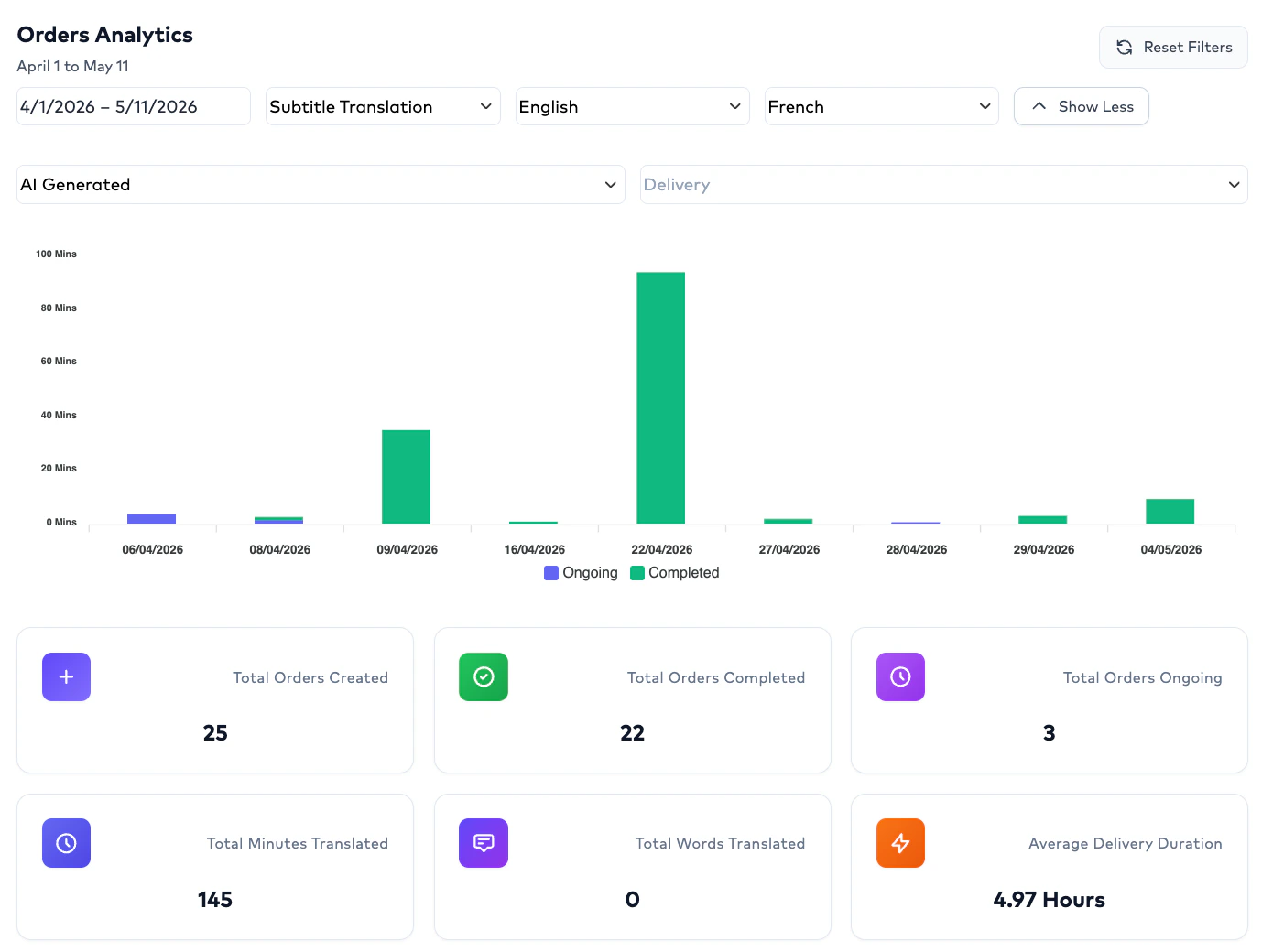
# Example Analytics Query
Example:
```text theme={null}
Filters Applied:
Start Date:
January 1
End Date:
February 28
Source Language:
English
Target Language:
French
Order Type:
Subtitle Translation
```
Result:
```text theme={null}
Localized subtitle activity
for English → French
within the selected timeframe
```
 ***
# Credit Overview
## Overview
Credit Overview provides visibility into:
* total AI credits,
* remaining AI credits,
* and localization consumption.
This helps organizations:
* manage localization budgets,
* understand operational usage,
* and monitor available processing capacity.
***
# Credit Visibility
The dashboard currently displays:
```text theme={null}
Total AI Credits
```
This helps operational teams understand:
* available localization capacity,
* and current AI usage availability.
***
# Payment Overview
## Overview
Payment Overview provides billing-related visibility for operational teams.
This section helps organizations understand:
* invoice-related activity,
* pending payment behavior,
* and financial status.
***
# Payment Information
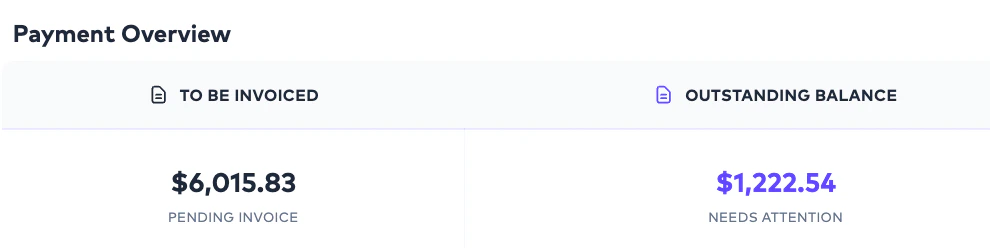
The Payment Overview currently includes:
Pending operational amounts expected to be invoiced.
Existing balance pending payment resolution.
***
# Credit Overview
## Overview
Credit Overview provides visibility into:
* total AI credits,
* remaining AI credits,
* and localization consumption.
This helps organizations:
* manage localization budgets,
* understand operational usage,
* and monitor available processing capacity.
***
# Credit Visibility
The dashboard currently displays:
```text theme={null}
Total AI Credits
```
This helps operational teams understand:
* available localization capacity,
* and current AI usage availability.
***
# Payment Overview
## Overview
Payment Overview provides billing-related visibility for operational teams.
This section helps organizations understand:
* invoice-related activity,
* pending payment behavior,
* and financial status.
***
# Payment Information
The Payment Overview currently includes:
Pending operational amounts expected to be invoiced.
Existing balance pending payment resolution.
 # Recent Order Details
## Overview
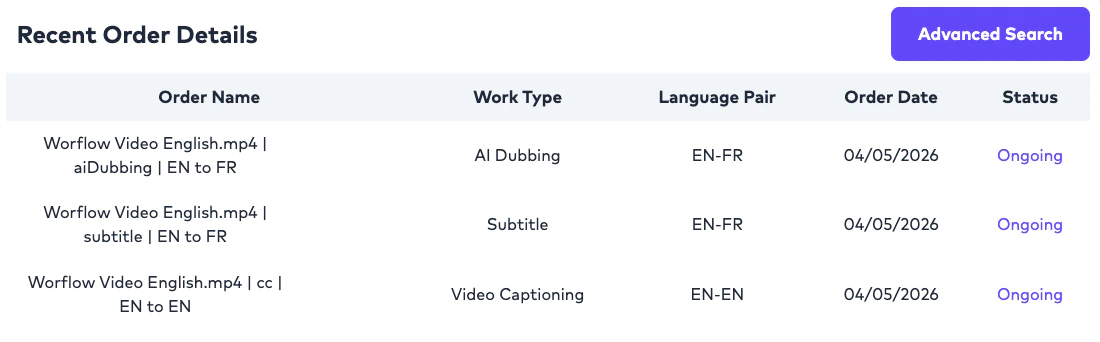
Recent Order Details provide operational visibility into:
* recently processed Orders,
* localization activity,
* and workflow execution.
This helps Project Management Users:
* quickly monitor activity,
* identify recent deliveries,
* and review localization progress.
# Recent Order Details
## Overview
Recent Order Details provide operational visibility into:
* recently processed Orders,
* localization activity,
* and workflow execution.
This helps Project Management Users:
* quickly monitor activity,
* identify recent deliveries,
* and review localization progress.
 ***
# Typical Order Details
Recent Orders commonly include:
* Order information,
* localization workflow details,
* language pair information,
* status,
* and operational delivery details.
***
# Advanced Search Navigation
The Analytics section includes:
* **Advanced Search**
This action redirects users to:
* the Global Search page.
This enables teams to:
* deeply investigate Orders,
* search historical activity,
* and perform operational tracking.
Workflow:
```text theme={null}
Analytics
↓
Advanced Search
↓
Global Search Page
```
***
# QC Score Progression by LLM
## Overview
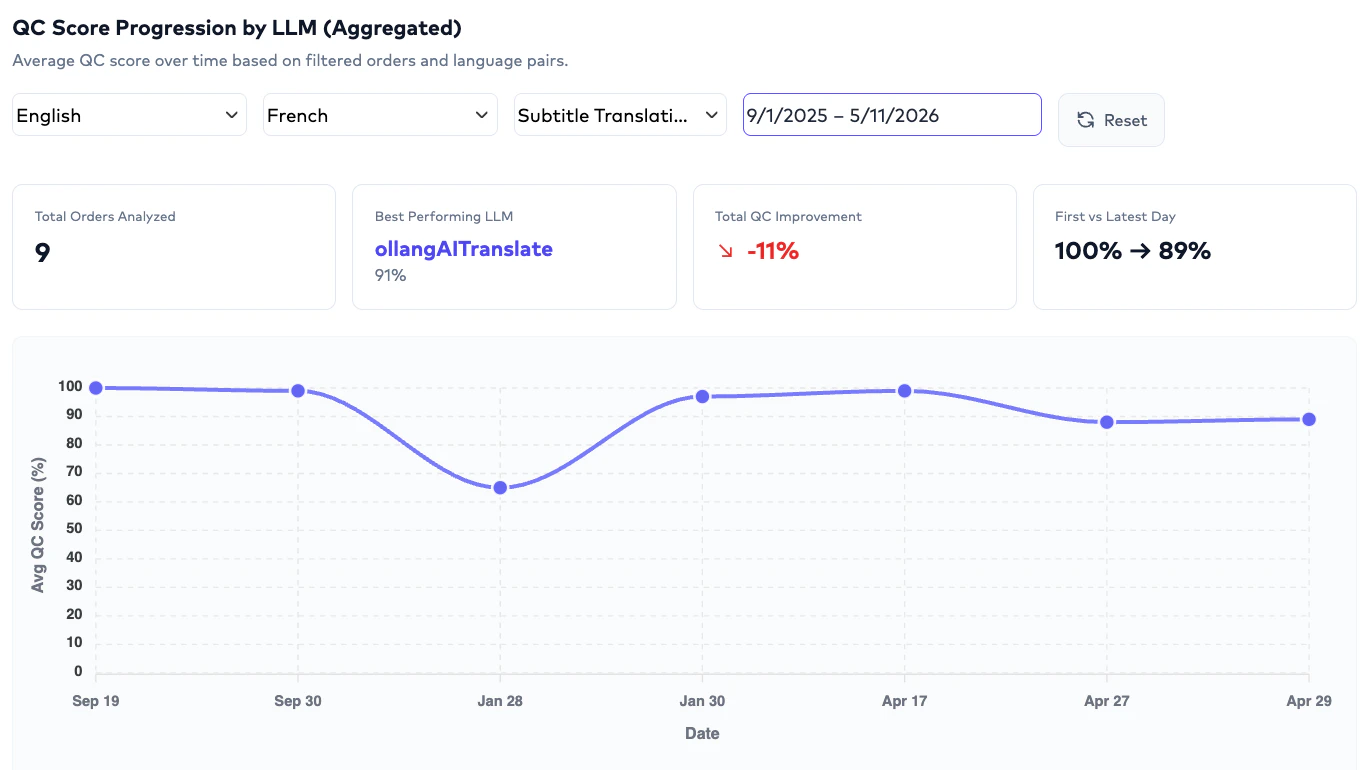
QC Score Progression by LLM provides:
* aggregated localization quality trends.
Rather than comparing individual provider runs directly, this analytics view helps organizations understand:
```text theme={null}
How localization quality
improves or changes over time
for a selected workflow.
```
***
# Available Filters
QC Score Progression supports:
Analyze localization quality across a selected timeframe.
Filter by source language.
Filter by target language.
Analyze QC progression for a specific workflow.
***
# How QC Progression Works
The system analyzes:
* average QC scores,
* quality progression trends,
* and localization improvements.
Example:
```text theme={null}
English → French
Subtitle Translation
Last 2 Months
```
The dashboard may show:
```text theme={null}
First Average QC Score:
78%
Latest Average QC Score:
92%
Best Performing LLM:
Provider X
Improvement:
+14%
```
This helps organizations understand:
* quality evolution,
* workflow effectiveness,
* and localization performance over time.
***
# Important Clarification
QC Score Progression is an aggregated trend analysis and not a side-by-side comparison of every provider run.
The platform highlights:
* first QC score average,
* latest QC score average,
* best-performing LLM,
* and quality improvement trends.
***
# Typical Order Details
Recent Orders commonly include:
* Order information,
* localization workflow details,
* language pair information,
* status,
* and operational delivery details.
***
# Advanced Search Navigation
The Analytics section includes:
* **Advanced Search**
This action redirects users to:
* the Global Search page.
This enables teams to:
* deeply investigate Orders,
* search historical activity,
* and perform operational tracking.
Workflow:
```text theme={null}
Analytics
↓
Advanced Search
↓
Global Search Page
```
***
# QC Score Progression by LLM
## Overview
QC Score Progression by LLM provides:
* aggregated localization quality trends.
Rather than comparing individual provider runs directly, this analytics view helps organizations understand:
```text theme={null}
How localization quality
improves or changes over time
for a selected workflow.
```
***
# Available Filters
QC Score Progression supports:
Analyze localization quality across a selected timeframe.
Filter by source language.
Filter by target language.
Analyze QC progression for a specific workflow.
***
# How QC Progression Works
The system analyzes:
* average QC scores,
* quality progression trends,
* and localization improvements.
Example:
```text theme={null}
English → French
Subtitle Translation
Last 2 Months
```
The dashboard may show:
```text theme={null}
First Average QC Score:
78%
Latest Average QC Score:
92%
Best Performing LLM:
Provider X
Improvement:
+14%
```
This helps organizations understand:
* quality evolution,
* workflow effectiveness,
* and localization performance over time.
***
# Important Clarification
QC Score Progression is an aggregated trend analysis and not a side-by-side comparison of every provider run.
The platform highlights:
* first QC score average,
* latest QC score average,
* best-performing LLM,
* and quality improvement trends.
 ***
# Average Human Edit Percentage
## Overview
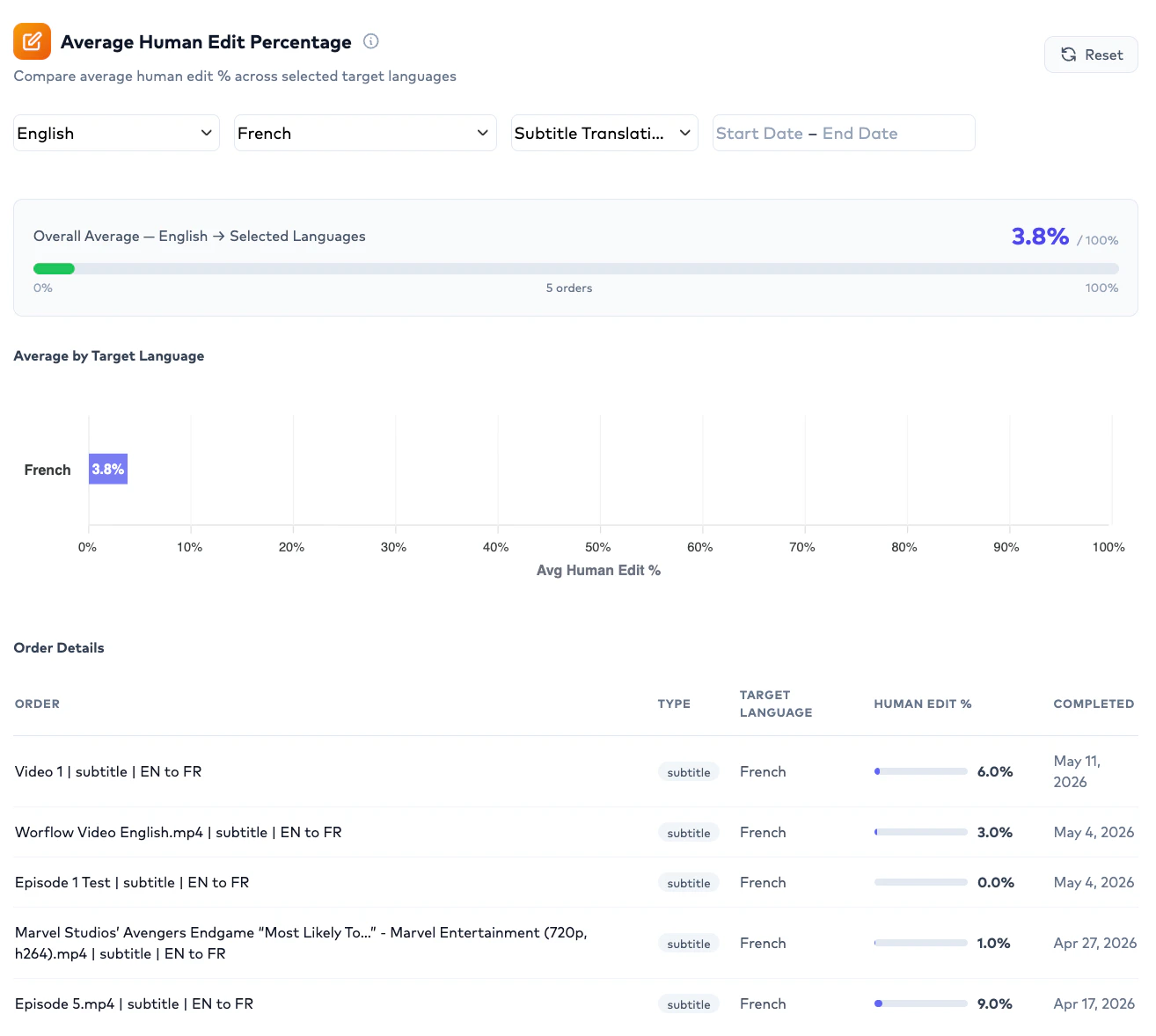
Average Human Edit Percentage helps organizations understand:
```text theme={null}
How much AI-generated content
was modified during human review.
```
This metric is especially useful for:
* benchmarking provider quality,
* evaluating localization efficiency,
* identifying problematic language pairs,
* and optimizing workflows.
***
# Human Edit Filters
Average Human Edit Percentage supports:
Analyze human edit behavior within a selected timeframe.
Analyze edit behavior for specific source languages.
Analyze edit behavior for target markets.
Evaluate edit percentage across localization workflows.
***
# Measurement Methodology
Human Edit Percentage is measured at:
* segment level.
This means the platform evaluates:
```text theme={null}
How much subtitle content
required modification
during human review.
```
The dashboard provides:
* overall average human edit percentage,
* and Order-level edit details.
***
# Example Human Edit Analysis
Example:
```text theme={null}
English → French
Subtitle Translation
Date Range:
30 Days
```
Result:
```text theme={null}
Average Human Edit:
22%
Order Details:
Order A → 15%
Order B → 32%
Order C → 18%
```
This helps organizations identify:
* efficient workflows,
* high-performing providers,
* and problematic localization patterns.
***
# Average Human Edit Percentage
## Overview
Average Human Edit Percentage helps organizations understand:
```text theme={null}
How much AI-generated content
was modified during human review.
```
This metric is especially useful for:
* benchmarking provider quality,
* evaluating localization efficiency,
* identifying problematic language pairs,
* and optimizing workflows.
***
# Human Edit Filters
Average Human Edit Percentage supports:
Analyze human edit behavior within a selected timeframe.
Analyze edit behavior for specific source languages.
Analyze edit behavior for target markets.
Evaluate edit percentage across localization workflows.
***
# Measurement Methodology
Human Edit Percentage is measured at:
* segment level.
This means the platform evaluates:
```text theme={null}
How much subtitle content
required modification
during human review.
```
The dashboard provides:
* overall average human edit percentage,
* and Order-level edit details.
***
# Example Human Edit Analysis
Example:
```text theme={null}
English → French
Subtitle Translation
Date Range:
30 Days
```
Result:
```text theme={null}
Average Human Edit:
22%
Order Details:
Order A → 15%
Order B → 32%
Order C → 18%
```
This helps organizations identify:
* efficient workflows,
* high-performing providers,
* and problematic localization patterns.
 ***
# Using Analytics for Workflow Optimization
Organizations commonly use Analytics to answer questions such as:
```text theme={null}
Which workflow performs best
for English → French subtitles?
```
```text theme={null}
Which provider reduces
human editing effort?
```
```text theme={null}
Which localization workflows
improve QC score over time?
```
This helps teams:
* improve localization quality,
* optimize provider selection,
* reduce review effort,
* and benchmark multilingual performance.
***
# Best Practices
Organizations typically achieve the best outcomes by combining:
```text theme={null}
QC Score Progression
+
Human Edit Percentage
+
AI QC Evaluation
+
Human QC Annotation
```
This provides visibility into:
* AI quality,
* human correction effort,
* localization consistency,
* and long-term optimization opportunities.
***
# Important Operational Notes
Only users with Access Billing permission can access the Analytics section.
No. The analytics show aggregated quality progression and best-performing LLM insights rather than run-by-run comparisons.
It measures how much AI-generated content was modified during human review at segment level.
Yes. Analytics support Source Language and Target Language filtering.
Advanced Search redirects users to the Global Search page for deeper operational investigation.
Yes. Analytics help organizations benchmark localization quality, provider effectiveness, and human review effort.
***
# Using Analytics for Workflow Optimization
Organizations commonly use Analytics to answer questions such as:
```text theme={null}
Which workflow performs best
for English → French subtitles?
```
```text theme={null}
Which provider reduces
human editing effort?
```
```text theme={null}
Which localization workflows
improve QC score over time?
```
This helps teams:
* improve localization quality,
* optimize provider selection,
* reduce review effort,
* and benchmark multilingual performance.
***
# Best Practices
Organizations typically achieve the best outcomes by combining:
```text theme={null}
QC Score Progression
+
Human Edit Percentage
+
AI QC Evaluation
+
Human QC Annotation
```
This provides visibility into:
* AI quality,
* human correction effort,
* localization consistency,
* and long-term optimization opportunities.
***
# Important Operational Notes
Only users with Access Billing permission can access the Analytics section.
No. The analytics show aggregated quality progression and best-performing LLM insights rather than run-by-run comparisons.
It measures how much AI-generated content was modified during human review at segment level.
Yes. Analytics support Source Language and Target Language filtering.
Advanced Search redirects users to the Global Search page for deeper operational investigation.
Yes. Analytics help organizations benchmark localization quality, provider effectiveness, and human review effort.