> ## Documentation Index
> Fetch the complete documentation index at: https://api-docs.ollang.com/llms.txt
> Use this file to discover all available pages before exploring further.
# Deliverables and Export Pipelines
> Understand downloadable outputs, subtitle export formats, dubbing deliverables, and operational delivery workflows inside the Ollang Project Management Dashboard.
## Overview
The Ollang Project Management Dashboard supports multiple deliverable types depending on:
* workflow configuration,
* Order type,
* dubbing style,
* subtitle requirements,
* and operational delivery structure.
Different workflows generate:
* different downloadable assets,
* different export formats,
* and different operational outputs.
For example:
* Subtitle Translation workflows prioritize subtitle exports,
* AI Dubbing workflows prioritize multilingual audio/video deliverables,
* Audio Description workflows prioritize accessibility outputs,
* and Studio Dubbing workflows prioritize Mixmaster coordination and studio delivery assets.
***
# Deliverables by Workflow Type
Generates subtitle exports such as SRT, VTT, ASS, SCC, STL, and broadcast-compatible formats.
Generates dubbed audio, mixed video outputs, vocals-only files, and M\&E assets.
Generates accessibility narration tracks and accessibility-focused multilingual audio outputs.
Supports externally uploaded dubbing assets, Mixmaster coordination, and final delivery workflows.
***
# Subtitle Deliverables
## Overview
Subtitle workflows support:
* multilingual subtitle exports,
* broadcast-compatible subtitle formats,
* localization review workflows,
* and dubbing-support subtitle structures.
These exports are commonly used for:
* streaming platforms,
* broadcasters,
* accessibility workflows,
* multilingual content distribution,
* and subtitle editing operations.
# Supported Subtitle Export Formats
The platform currently supports:
***
# Subtitle Format Explanations
Standard subtitle format commonly used for streaming, YouTube, subtitle editing, and multilingual delivery workflows.
WebVTT subtitle format commonly used for browser-based and HTML5 video workflows.
Broadcast-oriented subtitle format used for television and enterprise media distribution.
Captioning format commonly used for broadcast and closed-captioning workflows.
Advanced subtitle format supporting styling, formatting, and advanced subtitle positioning behavior.
Enhanced ASS workflow preserving subtitle styling and presentation formatting.
Export optimized for voice actors, dubbing studios, and multilingual recording coordination.
Operational export formats commonly used for review, auditing, reporting, and enterprise workflows.
***
# FN Excluded Deliverables
The platform additionally supports:
* SCC-FN Excluded
* SRT-FN Excluded
* DFXP-FN Excluded
* ASS-FN Excluded
These specialized exports are commonly used for:
* broadcast compliance,
* subtitle formatting compatibility,
* and enterprise delivery requirements.
# Subtitle Export Operational Philosophy
Different subtitle formats exist because different broadcasters, streaming platforms, and operational workflows require different subtitle structures.
Examples:
* streaming platforms may require SRT or VTT
* broadcasters may require STL or SCC
* advanced subtitle styling workflows may require ASS or Stylized ASS
***
# AI Dubbing Deliverables
## Overview
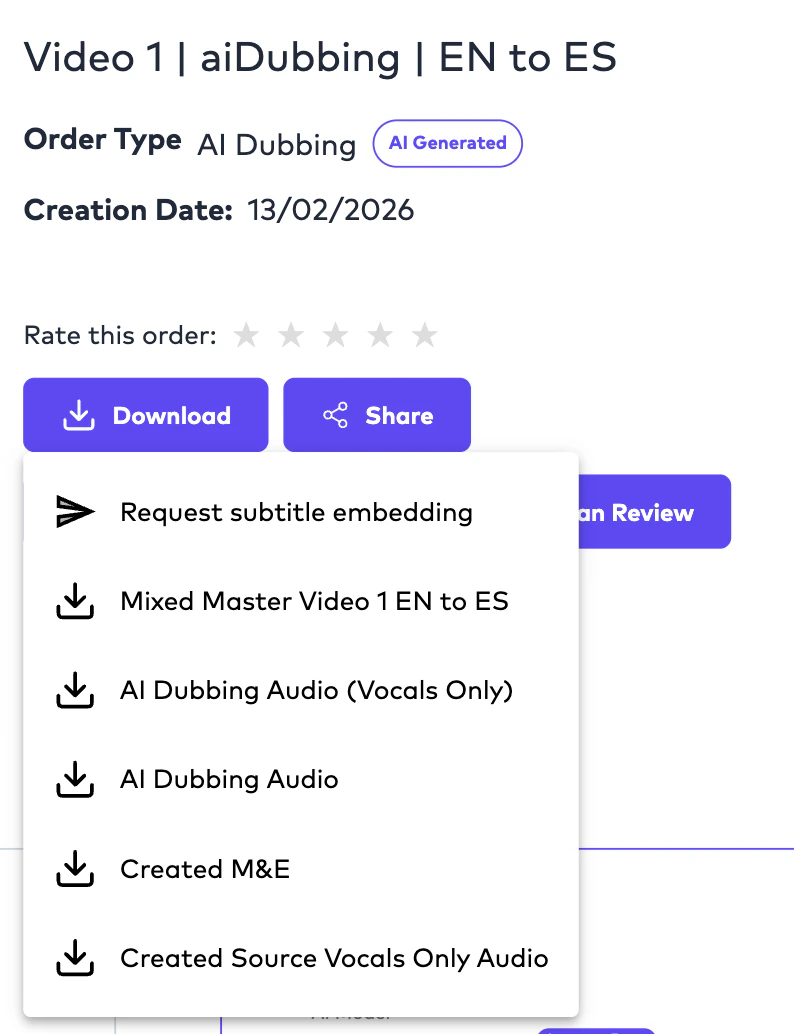
AI Dubbing workflows generate:
* multilingual dubbed audio vocals,
* mixed video output,
* and downloadable production files.
Depending on workflow configuration, AI Dubbing may generate:
* audio-only outputs,
* video outputs,
* vocals-only files,
* and M\&E-related deliverables simultaneously.
 ***
# Standard AI Dubbing Deliverables
The platform may generate:
Video output containing embedded localized subtitles.
Final mixed video containing localized dubbed audio.
Final dubbed audio output containing mixed operational audio.
Dubbed vocals isolated from environmental audio layers.
Generated or extracted Music & Effects track.
Isolated source-language vocals extracted from original media.
# Understanding M\&E Deliverables
## What is Created M\&E?
Created M\&E refers to:
* Music and Effects tracks generated or extracted from source media.
These tracks preserve:
* background music,
* environmental sounds,
* and non-dialogue audio,
while removing:
* spoken vocals.
M\&E deliverables are especially important for:
* AI Dubbing,
* Studio Dubbing,
* vocal replacement workflows,
* and professional audio mixing operations.
***
# Understanding Source Vocals Outputs
Created Source Vocals Only Audio contains:
* isolated source-language speech without environmental audio layers.
These files are useful for:
* dubbing review,
* speech analysis,
* timing verification,
* and studio coordination workflows.
***
# Audio Description Deliverables
## Overview
When Audio Description dubbing style is selected, the platform may generate accessibility-focused outputs optimized for:
* narration review,
* accessibility playback,
* and multilingual accessibility distribution.
***
# Standard AI Dubbing Deliverables
The platform may generate:
Video output containing embedded localized subtitles.
Final mixed video containing localized dubbed audio.
Final dubbed audio output containing mixed operational audio.
Dubbed vocals isolated from environmental audio layers.
Generated or extracted Music & Effects track.
Isolated source-language vocals extracted from original media.
# Understanding M\&E Deliverables
## What is Created M\&E?
Created M\&E refers to:
* Music and Effects tracks generated or extracted from source media.
These tracks preserve:
* background music,
* environmental sounds,
* and non-dialogue audio,
while removing:
* spoken vocals.
M\&E deliverables are especially important for:
* AI Dubbing,
* Studio Dubbing,
* vocal replacement workflows,
* and professional audio mixing operations.
***
# Understanding Source Vocals Outputs
Created Source Vocals Only Audio contains:
* isolated source-language speech without environmental audio layers.
These files are useful for:
* dubbing review,
* speech analysis,
* timing verification,
* and studio coordination workflows.
***
# Audio Description Deliverables
## Overview
When Audio Description dubbing style is selected, the platform may generate accessibility-focused outputs optimized for:
* narration review,
* accessibility playback,
* and multilingual accessibility distribution.
 ***
# Audio Description Outputs
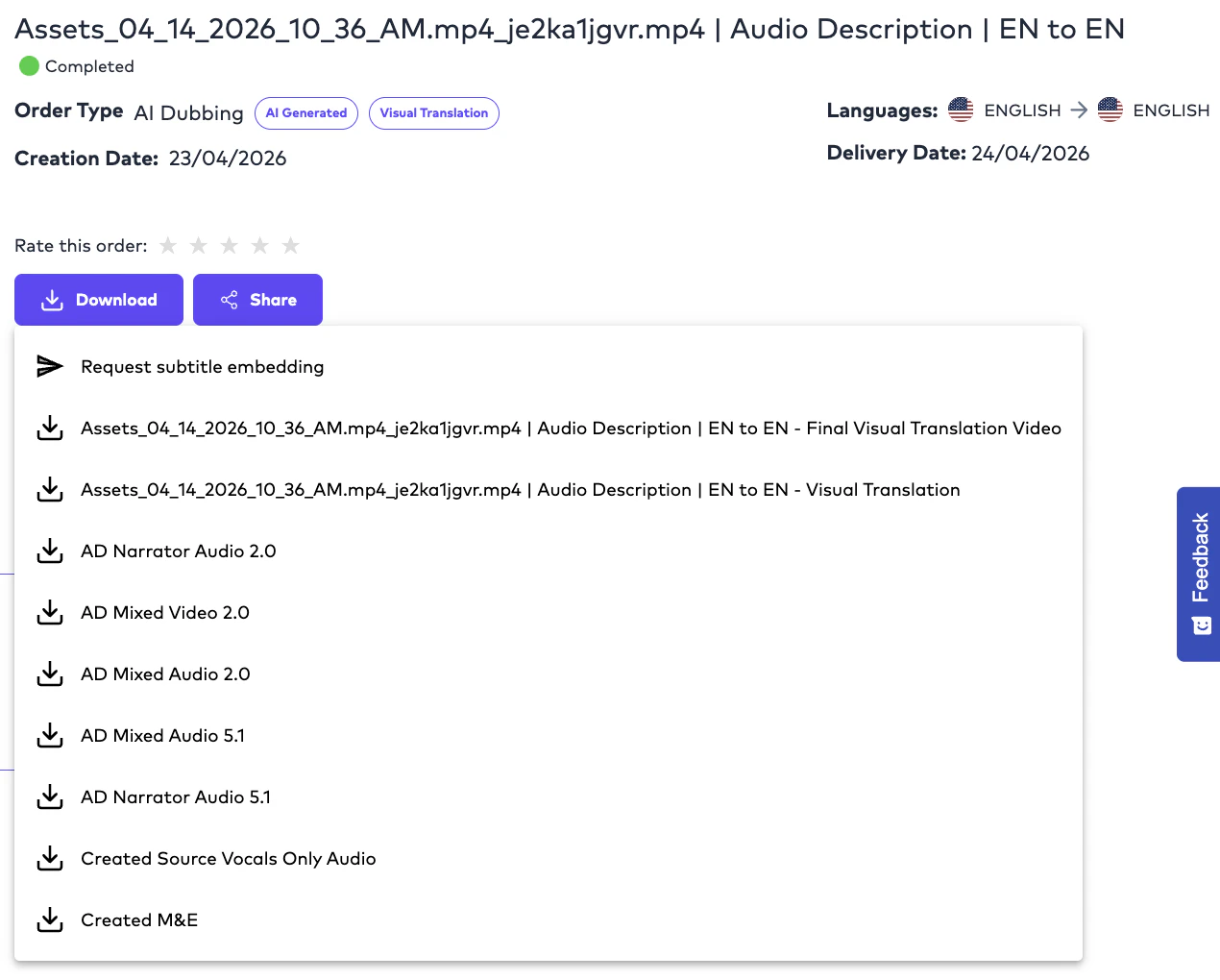
The platform may generate:
***
# Audio Description Deliverable Explanations
Contains isolated Audio Description narration output used for accessibility review and narration validation.
Contains Audio Description narration mixed with source media audio for accessibility playback workflows.
Used for cinematic audio workflows, surround-sound environments, and professional media delivery.
Used for stereo playback, web distribution, and lightweight accessibility delivery workflows.
***
# Studio Dubbing Deliverables
## Overview
Studio Dubbing workflows support:
* externally generated dubbing deliverables,
* studio-produced vocal assets,
* and Mixmaster-oriented production workflows.
Unlike AI Dubbing:
* final voice recording occurs externally.
The platform acts as:
* the operational coordination and delivery layer.
***
# Studio Dubbing Upload Workflows
Studios and vendors may upload:
* dubbing vocals,
* final mixed outputs,
* Mixmaster files,
* and externally generated dubbing deliverables.
The system can then:
* coordinate operational delivery,
* process audio workflows,
* and manage final output generation.
# Important Studio Dubbing Rule
Studios **cannot** deliver isolated vocals-only files without sufficient operational audio structure.
Delivery workflows require:
* either final mixed outputs,
* or sufficient audio assets for operational Mixmaster generation.
***
# Embedded Subtitle Videos
## Overview
Embedded Subtitle Videos contain:
* subtitles permanently rendered into the video output which can be triggered either by an API operation or manually by pressing the download option inside the order deliverables as shown below:\\
***
# Audio Description Outputs
The platform may generate:
***
# Audio Description Deliverable Explanations
Contains isolated Audio Description narration output used for accessibility review and narration validation.
Contains Audio Description narration mixed with source media audio for accessibility playback workflows.
Used for cinematic audio workflows, surround-sound environments, and professional media delivery.
Used for stereo playback, web distribution, and lightweight accessibility delivery workflows.
***
# Studio Dubbing Deliverables
## Overview
Studio Dubbing workflows support:
* externally generated dubbing deliverables,
* studio-produced vocal assets,
* and Mixmaster-oriented production workflows.
Unlike AI Dubbing:
* final voice recording occurs externally.
The platform acts as:
* the operational coordination and delivery layer.
***
# Studio Dubbing Upload Workflows
Studios and vendors may upload:
* dubbing vocals,
* final mixed outputs,
* Mixmaster files,
* and externally generated dubbing deliverables.
The system can then:
* coordinate operational delivery,
* process audio workflows,
* and manage final output generation.
# Important Studio Dubbing Rule
Studios **cannot** deliver isolated vocals-only files without sufficient operational audio structure.
Delivery workflows require:
* either final mixed outputs,
* or sufficient audio assets for operational Mixmaster generation.
***
# Embedded Subtitle Videos
## Overview
Embedded Subtitle Videos contain:
* subtitles permanently rendered into the video output which can be triggered either by an API operation or manually by pressing the download option inside the order deliverables as shown below:\\
 \
These deliverables are commonly used for:
* social media localization,
* marketing campaigns,
* platform distribution,
* and playback environments where external subtitle tracks are not supported.
***
# Dubbing Scripts
## Overview
Dubbing Script exports are optimized for:
* voice actors,
* dubbing studios,
* linguists,
* and recording coordination workflows.
These scripts may contain:
* subtitle timing,
* dialogue segmentation,
* speaker structures,
* and localization references.
***
# XLSX Deliverables
## Overview
XLSX deliverables are commonly used for:
* enterprise review,
* subtitle auditing,
* reporting,
* translation review,
* and workflow validation.
These exports are especially useful for:
* localization operations teams,
* external reviewers,
* and enterprise stakeholders.
***
# Example AI Dubbing Delivery Workflow
```text theme={null}
Source Video
↓
Speech-to-Text
↓
Subtitle Translation
↓
AI Voice Generation
↓
Audio Mixing
↓
Generated Deliverables:
- Mixed Master Video
- AI Dubbing Audio
- M&E
- Vocals Only
- Embedded Subtitle Video
```
***
# Example Subtitle Delivery Workflow
```text theme={null}
Source Video
↓
CC Generation
↓
French Subtitle Translation
↓
Linguist Review
↓
Generated Deliverables:
- SRT
- VTT
- ASS
- STL
- DFXP
```
***
# Export Strategy by Use Case
Common exports:
* SRT
* VTT
* Embedded Subtitle Video
Common exports:
* STL
* SCC
* DFXP
Common exports:
* Dubbing Script
* Vocals
* M\&E
* Mixed Master
Common exports:
* Audio Description Outputs
* Narration Audio
* Accessibility Video Deliverables
***
# Operational Philosophy
Different workflows intentionally generate different deliverables because localization operations vary significantly across media, accessibility, enterprise, and production environments.
The platform is designed to support:
* multilingual distribution,
* accessibility operations,
* enterprise localization,
* professional dubbing,
* and downstream media production pipelines.
***
# Important Operational Notes
Yes. Depending on workflow configuration, a single Order may generate multiple subtitle, audio, video, and operational deliverables simultaneously.
Different broadcasters, streaming platforms, and operational workflows require different subtitle structures and compatibility standards.
M\&E outputs preserve music and environmental audio while localized vocals replace original spoken dialogue during dubbing workflows.
AI Dubbing Audio contains mixed operational audio, while Vocals Only outputs isolate speech from background audio layers.
Yes. Studio Dubbing workflows support externally uploaded mixed outputs and studio-generated dubbing assets.
\
These deliverables are commonly used for:
* social media localization,
* marketing campaigns,
* platform distribution,
* and playback environments where external subtitle tracks are not supported.
***
# Dubbing Scripts
## Overview
Dubbing Script exports are optimized for:
* voice actors,
* dubbing studios,
* linguists,
* and recording coordination workflows.
These scripts may contain:
* subtitle timing,
* dialogue segmentation,
* speaker structures,
* and localization references.
***
# XLSX Deliverables
## Overview
XLSX deliverables are commonly used for:
* enterprise review,
* subtitle auditing,
* reporting,
* translation review,
* and workflow validation.
These exports are especially useful for:
* localization operations teams,
* external reviewers,
* and enterprise stakeholders.
***
# Example AI Dubbing Delivery Workflow
```text theme={null}
Source Video
↓
Speech-to-Text
↓
Subtitle Translation
↓
AI Voice Generation
↓
Audio Mixing
↓
Generated Deliverables:
- Mixed Master Video
- AI Dubbing Audio
- M&E
- Vocals Only
- Embedded Subtitle Video
```
***
# Example Subtitle Delivery Workflow
```text theme={null}
Source Video
↓
CC Generation
↓
French Subtitle Translation
↓
Linguist Review
↓
Generated Deliverables:
- SRT
- VTT
- ASS
- STL
- DFXP
```
***
# Export Strategy by Use Case
Common exports:
* SRT
* VTT
* Embedded Subtitle Video
Common exports:
* STL
* SCC
* DFXP
Common exports:
* Dubbing Script
* Vocals
* M\&E
* Mixed Master
Common exports:
* Audio Description Outputs
* Narration Audio
* Accessibility Video Deliverables
***
# Operational Philosophy
Different workflows intentionally generate different deliverables because localization operations vary significantly across media, accessibility, enterprise, and production environments.
The platform is designed to support:
* multilingual distribution,
* accessibility operations,
* enterprise localization,
* professional dubbing,
* and downstream media production pipelines.
***
# Important Operational Notes
Yes. Depending on workflow configuration, a single Order may generate multiple subtitle, audio, video, and operational deliverables simultaneously.
Different broadcasters, streaming platforms, and operational workflows require different subtitle structures and compatibility standards.
M\&E outputs preserve music and environmental audio while localized vocals replace original spoken dialogue during dubbing workflows.
AI Dubbing Audio contains mixed operational audio, while Vocals Only outputs isolate speech from background audio layers.
Yes. Studio Dubbing workflows support externally uploaded mixed outputs and studio-generated dubbing assets.