> ## Documentation Index
> Fetch the complete documentation index at: https://api-docs.ollang.com/llms.txt
> Use this file to discover all available pages before exploring further.
# Order Types and Workflow Architecture
> Understand how AI Dubbing, Subtitle Translation, Video Captioning, Document Translation, and Studio Dubbing workflows operate inside the Ollang Project Management Dashboard.
 **Who this is for** — Product, operations, and engineering teams choosing
which Order Type fits a use case, and developers calling
[Create Order](/apis/ollang-api-reference/create-order). Each section
below explains the workflow, deliverables, and configuration knobs for
one Order Type. See [Order Types reference](/apis/ollang-api-reference/order-types)
for the canonical `orderType` enum values.
## Overview
Order Types define:
* what localization workflow is being executed,
* which AI orchestration pipeline is triggered,
* what source assets are utilized,
* what deliverables are generated,
* and how reviewers, linguists, or studios interact with the output.
Inside Ollang, an Order is not simply a translation request.
Each Order activates:
* AI orchestration,
* provider routing,
* workflow automation,
* assignment logic,
* deliverable generation,
* and optional human review operations.
Different Order Types may:
* consume different AI providers,
* expose different editing interfaces,
* and generate different exportable outputs.
***
# Available Order Types
The Ollang Project Management Dashboard currently supports:
Generate multilingual dubbed audio and localized video deliverables using AI voice synthesis workflows.
Translate subtitle assets and timed dialogue into one or multiple target languages.
Generate transcription and caption files from source media.
Localize multilingual documents into one or multiple target languages.
Coordinate external dubbing studios and professional voice production workflows.
Localize on-screen text inside videos, graphics, presentations, and visual assets while preserving the original layout, positioning, and multilingual consistency.
Localize website content, UI strings, and structured localization files across multiple languages.
***
# AI Dubbing
## Overview
AI Dubbing is Ollang’s multilingual AI voice localization workflow.
The workflow automatically orchestrates:
* speech-to-text,
* subtitle generation,
* translation,
* voice synthesis,
* audio processing,
* and final deliverable generation.
AI Dubbing workflows are commonly used for:
* marketing videos,
* educational content,
* training materials,
* YouTube content,
* podcasts,
* enterprise localization,
* media distribution,
* and accessibility operations.
***
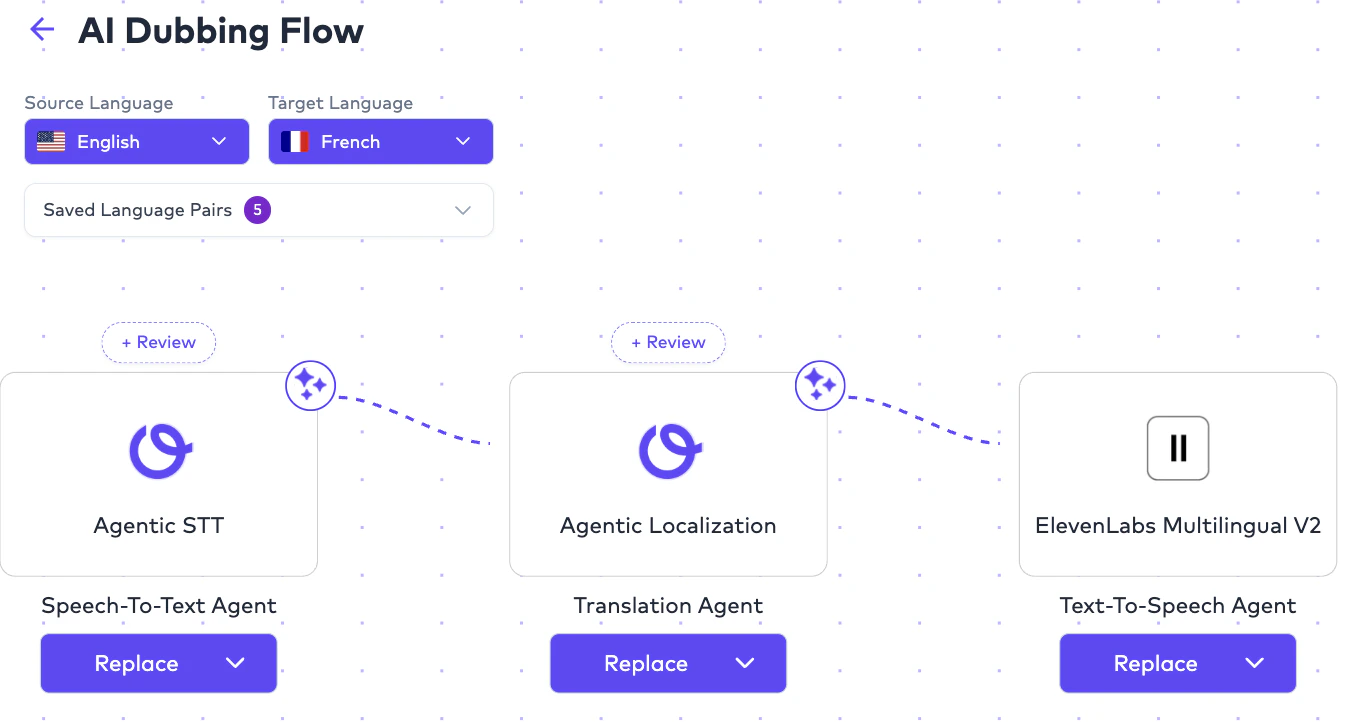
# Core AI Dubbing Pipeline
A typical AI Dubbing workflow internally follows:
```text theme={null}
Source Video / Audio
↓
Speech-to-Text (CC)
↓
Subtitle Translation
↓
Voice Synthesis (Text to Speech operations)
↓
Audio Mixing
↓
Order Deliverables (including the Final Mixmaster, Dubbed Vocals and Created M&E file)
```
Each stage may utilize:
* different AI providers,
* different workflow configurations,
* and different orchestration logic.
**Who this is for** — Product, operations, and engineering teams choosing
which Order Type fits a use case, and developers calling
[Create Order](/apis/ollang-api-reference/create-order). Each section
below explains the workflow, deliverables, and configuration knobs for
one Order Type. See [Order Types reference](/apis/ollang-api-reference/order-types)
for the canonical `orderType` enum values.
## Overview
Order Types define:
* what localization workflow is being executed,
* which AI orchestration pipeline is triggered,
* what source assets are utilized,
* what deliverables are generated,
* and how reviewers, linguists, or studios interact with the output.
Inside Ollang, an Order is not simply a translation request.
Each Order activates:
* AI orchestration,
* provider routing,
* workflow automation,
* assignment logic,
* deliverable generation,
* and optional human review operations.
Different Order Types may:
* consume different AI providers,
* expose different editing interfaces,
* and generate different exportable outputs.
***
# Available Order Types
The Ollang Project Management Dashboard currently supports:
Generate multilingual dubbed audio and localized video deliverables using AI voice synthesis workflows.
Translate subtitle assets and timed dialogue into one or multiple target languages.
Generate transcription and caption files from source media.
Localize multilingual documents into one or multiple target languages.
Coordinate external dubbing studios and professional voice production workflows.
Localize on-screen text inside videos, graphics, presentations, and visual assets while preserving the original layout, positioning, and multilingual consistency.
Localize website content, UI strings, and structured localization files across multiple languages.
***
# AI Dubbing
## Overview
AI Dubbing is Ollang’s multilingual AI voice localization workflow.
The workflow automatically orchestrates:
* speech-to-text,
* subtitle generation,
* translation,
* voice synthesis,
* audio processing,
* and final deliverable generation.
AI Dubbing workflows are commonly used for:
* marketing videos,
* educational content,
* training materials,
* YouTube content,
* podcasts,
* enterprise localization,
* media distribution,
* and accessibility operations.
***
# Core AI Dubbing Pipeline
A typical AI Dubbing workflow internally follows:
```text theme={null}
Source Video / Audio
↓
Speech-to-Text (CC)
↓
Subtitle Translation
↓
Voice Synthesis (Text to Speech operations)
↓
Audio Mixing
↓
Order Deliverables (including the Final Mixmaster, Dubbed Vocals and Created M&E file)
```
Each stage may utilize:
* different AI providers,
* different workflow configurations,
* and different orchestration logic.
 ***
# AI Dubbing Styles
AI Dubbing contains multiple dubbing styles.
Users select the dubbing style during Order configuration. Supported dubbing styles currently include:
Replace original vocals with localized dubbed vocals.
Preserve original audio underneath localized dubbed speech.
Generate accessibility narration describing visual actions and environments.
***
# Vocal Replacement
## Operational Behavior
Vocal Replacement replaces:
* the original source vocals,
with:
* localized/dubbed AI-generated vocals.
The system attempts to preserve:
* pacing,
* speech timing,
* speaker continuity,
* and natural dialogue flow.
This workflow is commonly used for:
* multilingual training content,
* enterprise localization,
* dubbed media,
* and multilingual distribution.
***
## Example Workflow
```text theme={null}
English Source Video
↓
English to French AI Dubbing Order created
↓
Original English Vocals Removed
↓
French Vocals Become Primary Audio Layer in the final Mix file
```
***
# Overdub
## Operational Behavior
Overdub workflows preserve:
* the original source audio,
while layering:
* localized dubbed vocals on top.
The original audio remains audible at reduced volume.
This workflow is commonly used for:
* documentaries,
* interviews,
* educational content,
* and narration-heavy workflows
***
## Example
```text theme={null}
Original English Speech (Low Volume)
+
Localized Spanish Dub (Primary Layer)
```
***
# Audio Description
## Overview
Audio Description (AD) workflows generate narration describing:
* visual actions,
* environments,
* scene transitions,
* gestures,
* and contextual visual information.
This workflow is designed for:
* accessibility localization,
* visually impaired audiences,
* compliance requirements,
* and inclusive media distribution.
# Rules
For Audio Description workflows:
* source language and target language are generally the same.
Example:
```text theme={null}
English Video
↓
English Audio Description
```
***
# Long-Form Audio Description Support
The platform supports Audio Description workflows for:
* short-form content,
* episodic media,
* enterprise training material,
* educational libraries,
* and long-form video content.
Examples include:
* 30-minute videos,
* 1-hour episodes,
* 2–3 hour productions,
* and enterprise accessibility libraries.
***
# AI Dubbing Deliverables
AI Dubbing workflows may generate:
***
# Audio Description Deliverables
When Audio Description dubbing style is selected, additional outputs may include:
* AD Mixed Audio 5.1
* AD Narrator Audio 2.0
* AD Narrator Audio 5.1
* AD Mixed Audio 2.0
* AD Mixed Video 2.0
* Created M\&E
* Created Source Vocals Only Audio
***
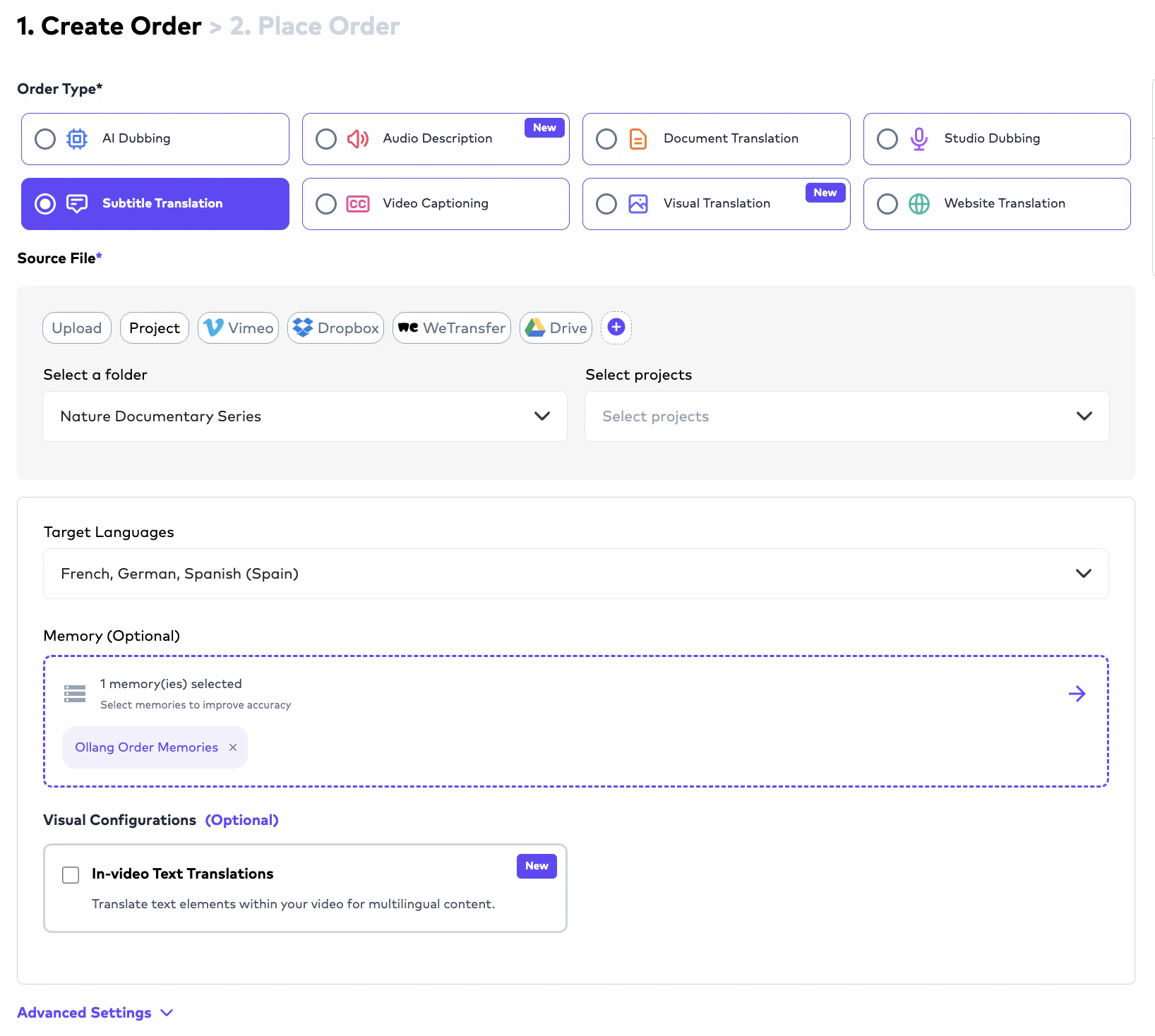
# Subtitle Translation
## Overview
Subtitle Translation workflows localize subtitle content from:
* source videos,
* source subtitle files,
* or transcription outputs
***
# AI Dubbing Styles
AI Dubbing contains multiple dubbing styles.
Users select the dubbing style during Order configuration. Supported dubbing styles currently include:
Replace original vocals with localized dubbed vocals.
Preserve original audio underneath localized dubbed speech.
Generate accessibility narration describing visual actions and environments.
***
# Vocal Replacement
## Operational Behavior
Vocal Replacement replaces:
* the original source vocals,
with:
* localized/dubbed AI-generated vocals.
The system attempts to preserve:
* pacing,
* speech timing,
* speaker continuity,
* and natural dialogue flow.
This workflow is commonly used for:
* multilingual training content,
* enterprise localization,
* dubbed media,
* and multilingual distribution.
***
## Example Workflow
```text theme={null}
English Source Video
↓
English to French AI Dubbing Order created
↓
Original English Vocals Removed
↓
French Vocals Become Primary Audio Layer in the final Mix file
```
***
# Overdub
## Operational Behavior
Overdub workflows preserve:
* the original source audio,
while layering:
* localized dubbed vocals on top.
The original audio remains audible at reduced volume.
This workflow is commonly used for:
* documentaries,
* interviews,
* educational content,
* and narration-heavy workflows
***
## Example
```text theme={null}
Original English Speech (Low Volume)
+
Localized Spanish Dub (Primary Layer)
```
***
# Audio Description
## Overview
Audio Description (AD) workflows generate narration describing:
* visual actions,
* environments,
* scene transitions,
* gestures,
* and contextual visual information.
This workflow is designed for:
* accessibility localization,
* visually impaired audiences,
* compliance requirements,
* and inclusive media distribution.
# Rules
For Audio Description workflows:
* source language and target language are generally the same.
Example:
```text theme={null}
English Video
↓
English Audio Description
```
***
# Long-Form Audio Description Support
The platform supports Audio Description workflows for:
* short-form content,
* episodic media,
* enterprise training material,
* educational libraries,
* and long-form video content.
Examples include:
* 30-minute videos,
* 1-hour episodes,
* 2–3 hour productions,
* and enterprise accessibility libraries.
***
# AI Dubbing Deliverables
AI Dubbing workflows may generate:
***
# Audio Description Deliverables
When Audio Description dubbing style is selected, additional outputs may include:
* AD Mixed Audio 5.1
* AD Narrator Audio 2.0
* AD Narrator Audio 5.1
* AD Mixed Audio 2.0
* AD Mixed Video 2.0
* Created M\&E
* Created Source Vocals Only Audio
***
# Subtitle Translation
## Overview
Subtitle Translation workflows localize subtitle content from:
* source videos,
* source subtitle files,
* or transcription outputs
 ***
# Typical Subtitle Translation Workflow
```text theme={null}
English Video
↓
English CC Generation
↓
French Subtitle Translation
↓
French Subtitle Editing (when the order has a Human in the Loop; otherwise the PM can edit the order after delivery via order assignment)
↓
Export Deliverables
```
***
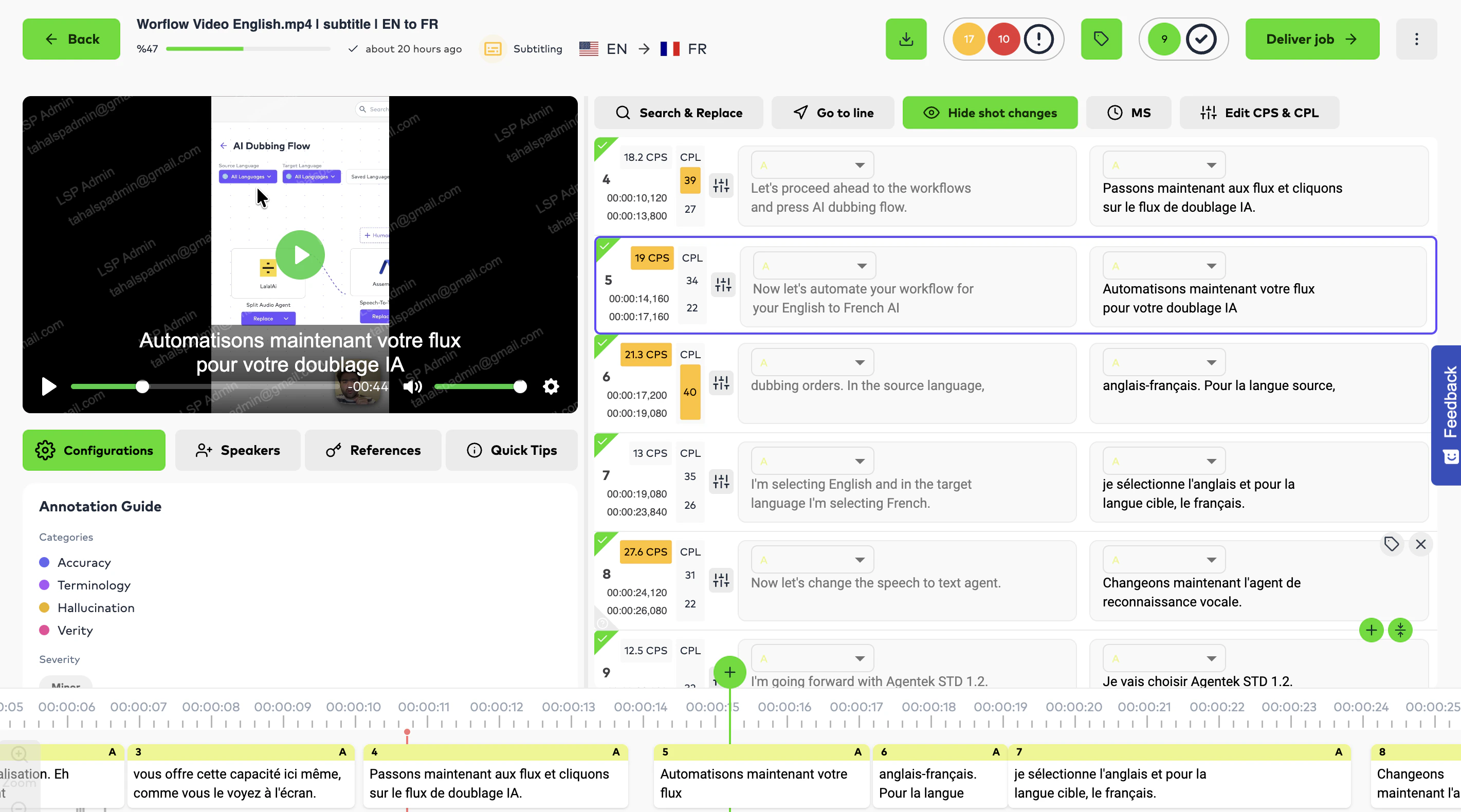
# Subtitle Editing Capabilities
Inside the Editor Interface, linguists can:
* edit subtitle text,
* modify timing,
* split subtitle segments,
* merge subtitle segments,
* optimize CPS/CPL compliance,
* reassign speakers,
* and refine readability or subtitle timing consistency.
***
# Typical Subtitle Translation Workflow
```text theme={null}
English Video
↓
English CC Generation
↓
French Subtitle Translation
↓
French Subtitle Editing (when the order has a Human in the Loop; otherwise the PM can edit the order after delivery via order assignment)
↓
Export Deliverables
```
***
# Subtitle Editing Capabilities
Inside the Editor Interface, linguists can:
* edit subtitle text,
* modify timing,
* split subtitle segments,
* merge subtitle segments,
* optimize CPS/CPL compliance,
* reassign speakers,
* and refine readability or subtitle timing consistency.
 ***
# Subtitle Export Formats
Completed Subtitle Translation workflows support exports including:
***
# FN Excluded Variants
The platform additionally supports:
* SCC-FN Excluded,
* SRT-FN Excluded,
* DFXP-FN Excluded,
* and ASS-FN Excluded export variants.
These specialized exports are commonly used for:
* broadcast compatibility,
* formatting workflows,
* and enterprise subtitle distribution requirements.
***
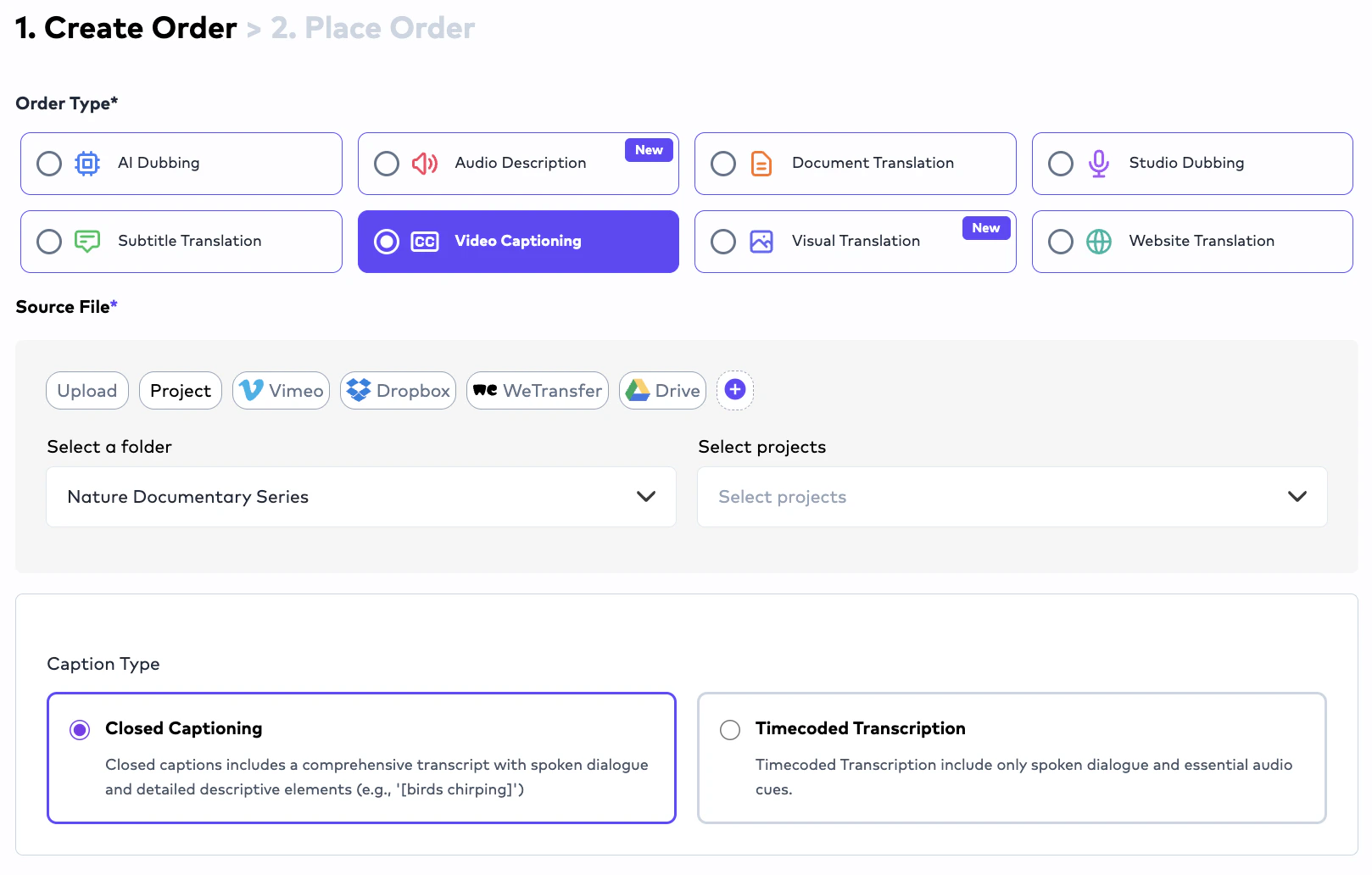
# Video Captioning (CC)
## Overview
Video Captioning (CC) workflows generate:
* timed transcription files,
* subtitle-ready caption structures,
* and foundational subtitle assets.
CC workflows are frequently used before:
* Subtitle Translation,
* AI Dubbing,
* or accessibility localization workflows.
***
# Subtitle Export Formats
Completed Subtitle Translation workflows support exports including:
***
# FN Excluded Variants
The platform additionally supports:
* SCC-FN Excluded,
* SRT-FN Excluded,
* DFXP-FN Excluded,
* and ASS-FN Excluded export variants.
These specialized exports are commonly used for:
* broadcast compatibility,
* formatting workflows,
* and enterprise subtitle distribution requirements.
***
# Video Captioning (CC)
## Overview
Video Captioning (CC) workflows generate:
* timed transcription files,
* subtitle-ready caption structures,
* and foundational subtitle assets.
CC workflows are frequently used before:
* Subtitle Translation,
* AI Dubbing,
* or accessibility localization workflows.
 ***
# Speaker Diarization
The platform supports:
* speaker separation,
* speaker labeling,
* and timed segmentation.
Speakers are internally labeled using structures such as:
* Speaker A,
* Speaker B,
* Speaker C.
For AI Dubbing workflows:
* additional gender assignment logic may be utilized to improve voice synthesis quality.
***
# Overlapping Speech Handling
When multiple speakers speak closely together:
* the system attempts to separate speakers into distinct timed segments.
The workflow attempts to avoid:
* combining multiple speakers into the same subtitle line whenever operationally possible.
Editors can additionally:
* split segments,
* reassign speakers,
* and manually refine subtitle structures.
***
# Multi-Provider STT Orchestration
Unlike platforms restricted to a single transcription provider, Ollang supports:
* multiple speech-to-text workflows,
* and configurable provider orchestration.
***
# Speaker Diarization
The platform supports:
* speaker separation,
* speaker labeling,
* and timed segmentation.
Speakers are internally labeled using structures such as:
* Speaker A,
* Speaker B,
* Speaker C.
For AI Dubbing workflows:
* additional gender assignment logic may be utilized to improve voice synthesis quality.
***
# Overlapping Speech Handling
When multiple speakers speak closely together:
* the system attempts to separate speakers into distinct timed segments.
The workflow attempts to avoid:
* combining multiple speakers into the same subtitle line whenever operationally possible.
Editors can additionally:
* split segments,
* reassign speakers,
* and manually refine subtitle structures.
***
# Multi-Provider STT Orchestration
Unlike platforms restricted to a single transcription provider, Ollang supports:
* multiple speech-to-text workflows,
* and configurable provider orchestration.
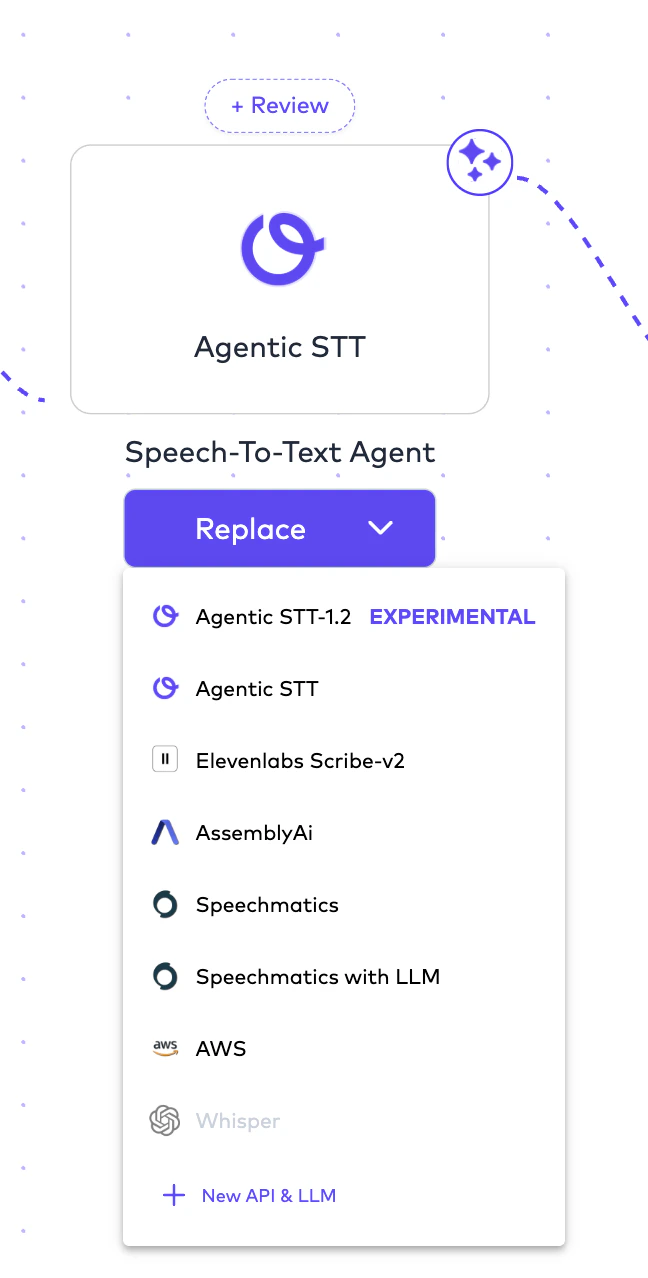 Organizations may configure providers such as:
* Ollang Agentic workflows,
* AssemblyAI,
* Speechmatics,
* AWS,
* and additional STT providers.
This allows organizations to optimize:
* transcription quality,
* diarization behavior,
* and language-specific performance.
***
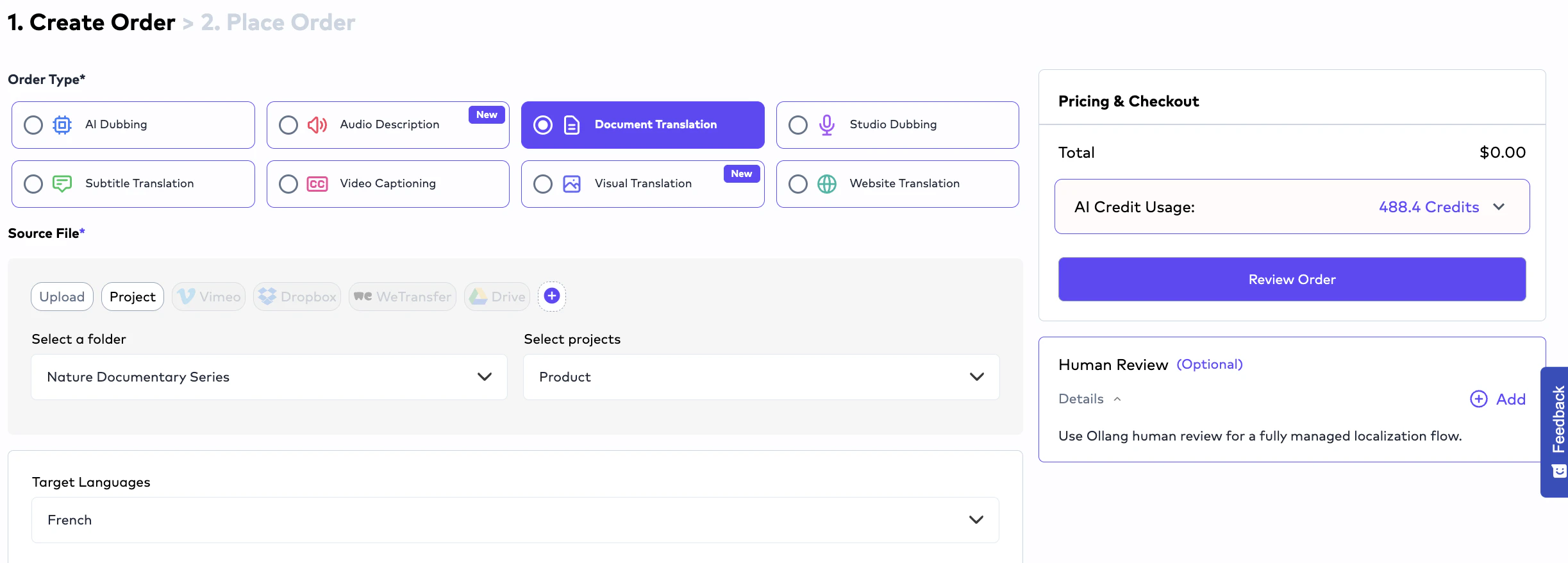
# Document Translation
## Overview
Document Translation workflows localize:
* office documents,
* structured localization resources,
* multilingual documentation,
* and software localization files.
The workflow supports both:
* simple office localization,
* and advanced structured localization pipelines.
Organizations may configure providers such as:
* Ollang Agentic workflows,
* AssemblyAI,
* Speechmatics,
* AWS,
* and additional STT providers.
This allows organizations to optimize:
* transcription quality,
* diarization behavior,
* and language-specific performance.
***
# Document Translation
## Overview
Document Translation workflows localize:
* office documents,
* structured localization resources,
* multilingual documentation,
* and software localization files.
The workflow supports both:
* simple office localization,
* and advanced structured localization pipelines.
 ***
# Supported Document Formats
The platform supports:
***
# Structured Localization Support
The platform supports structured localization formats including:
* XLIFF,
* SDLXLIFF,
* JSON,
* PO,
* subtitle assets,
* and HTML localization workflows.
This allows:
* engineering teams,
* localization operations,
* and product organizations
to operationalize multilingual content pipelines directly inside Ollang.
***
# Studio Dubbing
## Overview
Studio Dubbing workflows are designed for:
* professional dubbing studios,
* external localization vendors,
* enterprise voice teams,
* and production-based dubbing operations.
Unlike AI Dubbing:
* voice recording occurs externally.
The platform acts as:
* the operational coordination layer.
***
# Typical Studio Dubbing Pipeline
```text theme={null}
CC Generation
↓
Subtitle Translation
↓
Studio Recording (On the basis of Dubbing SRT files from the previous step)
↓
Asset/Deliverables Upload
↓
Mixmaster Generation (Ollang System)
↓
Final Delivery (Output files can be downloaded from the PM Interface)
```
Studios and vendors can upload:
* dubbing vocals,
* final mixed outputs,
* Mixmaster files,
* and studio-generated deliverables.
The system then:
* processes audio assets,
* coordinates operational workflows,
* and manages final delivery generation.
***
# Important Studio Dubbing Rule
Studios cannot deliver isolated vocals-only files without the required audio structure.
Delivery workflows require:
* either final mixed outputs,
* or sufficient audio structure for operational Mixmaster generation.
***
# Visual Translation
Visual Translation workflows localize text that appears visually inside media assets. Unlike traditional subtitle or dubbing workflows, Visual Translation focuses on:
* on-screen text,
* embedded graphics,
* banners,
* UI text,
* product screenshots,
* visual overlays,
* and image-based language elements.
This workflow is designed for:
* marketing campaigns,
* product videos,
* social media content,
* presentations,
* e-learning material,
* mobile app showcases,
* and multilingual visual content operations.
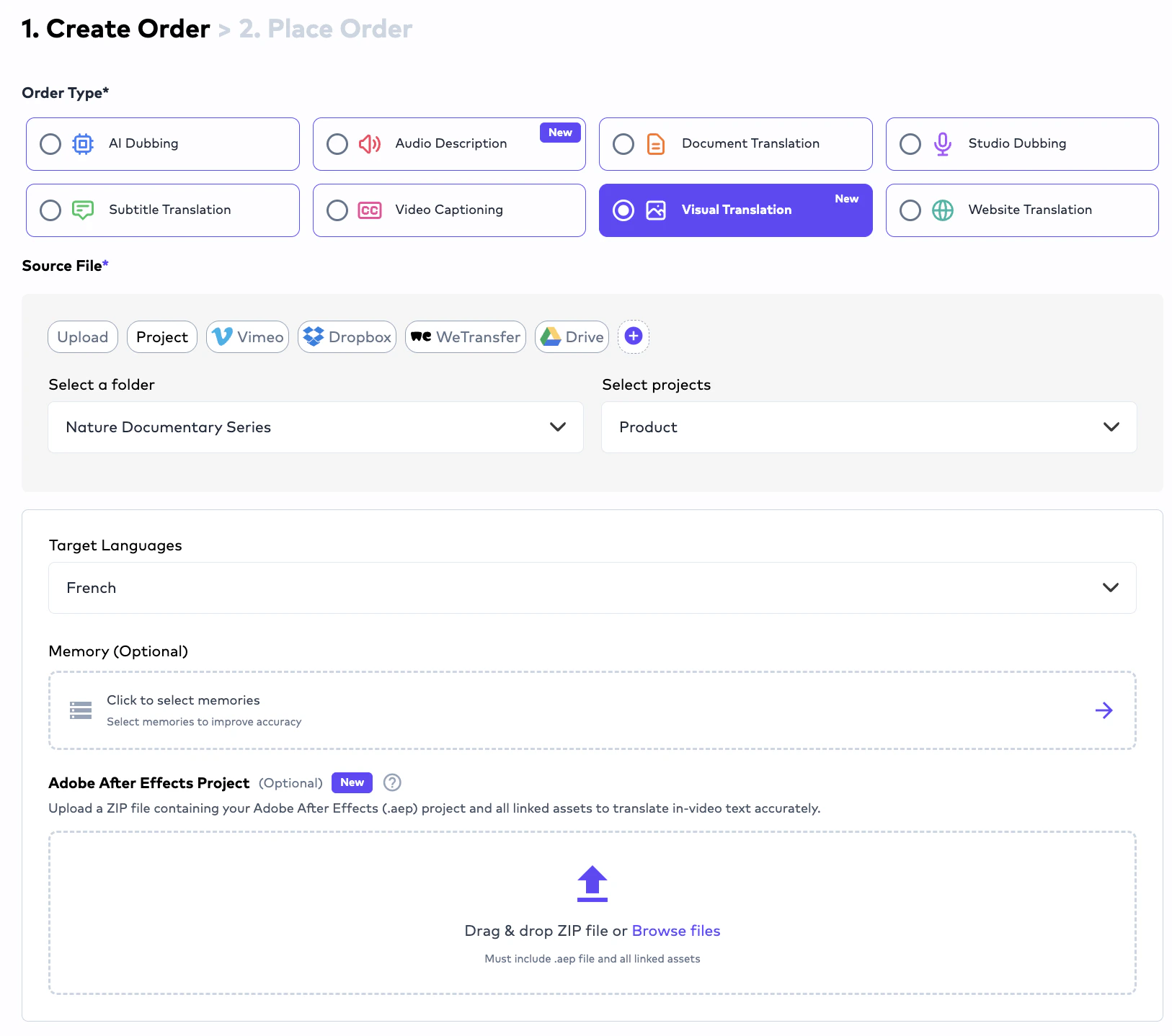
# Supported Visual Translation Inputs
Visual Translation workflows support:
Upload videos containing embedded visual text that requires multilingual localization.
Upload Adobe After Effects project files for structured visual localization workflows.
Translate visual text appearing directly inside images while preserving design structure.
Localize banners, graphics, presentations, and visual marketing materials.
***
# How Visual Translation Works
Visual Translation workflows typically operate as:
```text theme={null}
Source Video / Image / After Effects File
↓
Visual Text Detection
↓
Translation
↓
Text Replacement
↓
Localized Visual Output
```
The platform attempts to:
* detect visual text,
* preserve positioning,
* maintain formatting consistency,
* and localize embedded visual content.
***
# Image-to-Image Translation
Visual Translation also supports:
* image-based text localization.
This means:
* words embedded directly inside images,
* banners,
* screenshots,
* product visuals,
* presentations,
* or marketing assets
can be localized into target languages.
Example:
```text theme={null}
Source Image:
"Summer Sale"
Localized Image:
"Soldes d'été"
```
The workflow attempts to preserve:
* layout,
* design consistency,
* positioning,
* and visual readability.
***
# Adobe After Effects Support
Organizations may upload:
* Adobe After Effects project files
for structured localization workflows.
This is especially useful for:
* animated marketing videos,
* multilingual motion graphics,
* product launch campaigns,
* and enterprise creative localization.
The platform processes visual layers and localization workflows accordingly.
***
# Supported Document Formats
The platform supports:
***
# Structured Localization Support
The platform supports structured localization formats including:
* XLIFF,
* SDLXLIFF,
* JSON,
* PO,
* subtitle assets,
* and HTML localization workflows.
This allows:
* engineering teams,
* localization operations,
* and product organizations
to operationalize multilingual content pipelines directly inside Ollang.
***
# Studio Dubbing
## Overview
Studio Dubbing workflows are designed for:
* professional dubbing studios,
* external localization vendors,
* enterprise voice teams,
* and production-based dubbing operations.
Unlike AI Dubbing:
* voice recording occurs externally.
The platform acts as:
* the operational coordination layer.
***
# Typical Studio Dubbing Pipeline
```text theme={null}
CC Generation
↓
Subtitle Translation
↓
Studio Recording (On the basis of Dubbing SRT files from the previous step)
↓
Asset/Deliverables Upload
↓
Mixmaster Generation (Ollang System)
↓
Final Delivery (Output files can be downloaded from the PM Interface)
```
Studios and vendors can upload:
* dubbing vocals,
* final mixed outputs,
* Mixmaster files,
* and studio-generated deliverables.
The system then:
* processes audio assets,
* coordinates operational workflows,
* and manages final delivery generation.
***
# Important Studio Dubbing Rule
Studios cannot deliver isolated vocals-only files without the required audio structure.
Delivery workflows require:
* either final mixed outputs,
* or sufficient audio structure for operational Mixmaster generation.
***
# Visual Translation
Visual Translation workflows localize text that appears visually inside media assets. Unlike traditional subtitle or dubbing workflows, Visual Translation focuses on:
* on-screen text,
* embedded graphics,
* banners,
* UI text,
* product screenshots,
* visual overlays,
* and image-based language elements.
This workflow is designed for:
* marketing campaigns,
* product videos,
* social media content,
* presentations,
* e-learning material,
* mobile app showcases,
* and multilingual visual content operations.
# Supported Visual Translation Inputs
Visual Translation workflows support:
Upload videos containing embedded visual text that requires multilingual localization.
Upload Adobe After Effects project files for structured visual localization workflows.
Translate visual text appearing directly inside images while preserving design structure.
Localize banners, graphics, presentations, and visual marketing materials.
***
# How Visual Translation Works
Visual Translation workflows typically operate as:
```text theme={null}
Source Video / Image / After Effects File
↓
Visual Text Detection
↓
Translation
↓
Text Replacement
↓
Localized Visual Output
```
The platform attempts to:
* detect visual text,
* preserve positioning,
* maintain formatting consistency,
* and localize embedded visual content.
***
# Image-to-Image Translation
Visual Translation also supports:
* image-based text localization.
This means:
* words embedded directly inside images,
* banners,
* screenshots,
* product visuals,
* presentations,
* or marketing assets
can be localized into target languages.
Example:
```text theme={null}
Source Image:
"Summer Sale"
Localized Image:
"Soldes d'été"
```
The workflow attempts to preserve:
* layout,
* design consistency,
* positioning,
* and visual readability.
***
# Adobe After Effects Support
Organizations may upload:
* Adobe After Effects project files
for structured localization workflows.
This is especially useful for:
* animated marketing videos,
* multilingual motion graphics,
* product launch campaigns,
* and enterprise creative localization.
The platform processes visual layers and localization workflows accordingly.
 ***
# Typical Visual Translation Use Cases
Common use cases include:
* multilingual marketing videos,
* localized advertisements,
* product demonstrations,
* visual UI localization,
* social media campaigns,
* e-learning visuals,
* and multilingual creative operations.
***
# Website Translation
## Overview
Website Translation workflows enable organizations to localize websites into multiple languages using Ollang’s orchestration and MCP-based architecture.
Rather than manually exporting website files, organizations can connect website workflows directly through: Ollang MCP integrations.
This enables scalable multilingual website localization.
***
# How Website Translation Works
Website Translation workflows typically operate as:
```text theme={null}
Website Connection via MCP
↓
Website Content Extraction
↓
AI Translation
↓
Terminology & Memory Enforcement
↓
Localized Website Experience
```
Organizations can:
* localize websites into multiple languages,
* preserve multilingual consistency,
* reuse terminology memory,
* and operationalize global website localization.
# Website Localization Capabilities
Website Translation workflows can support localization of:
* website copy
* landing pages
* product descriptions
* metadata
* UI text
* multilingual navigation
* structured localization resources
* multilingual product experiences
***
# Typical Visual Translation Use Cases
Common use cases include:
* multilingual marketing videos,
* localized advertisements,
* product demonstrations,
* visual UI localization,
* social media campaigns,
* e-learning visuals,
* and multilingual creative operations.
***
# Website Translation
## Overview
Website Translation workflows enable organizations to localize websites into multiple languages using Ollang’s orchestration and MCP-based architecture.
Rather than manually exporting website files, organizations can connect website workflows directly through: Ollang MCP integrations.
This enables scalable multilingual website localization.
***
# How Website Translation Works
Website Translation workflows typically operate as:
```text theme={null}
Website Connection via MCP
↓
Website Content Extraction
↓
AI Translation
↓
Terminology & Memory Enforcement
↓
Localized Website Experience
```
Organizations can:
* localize websites into multiple languages,
* preserve multilingual consistency,
* reuse terminology memory,
* and operationalize global website localization.
# Website Localization Capabilities
Website Translation workflows can support localization of:
* website copy
* landing pages
* product descriptions
* metadata
* UI text
* multilingual navigation
* structured localization resources
* multilingual product experiences