> ## Documentation Index
> Fetch the complete documentation index at: https://api-docs.ollang.com/llms.txt
> Use this file to discover all available pages before exploring further.
# Core Platform Architecture
> Understand how the Ollang Project Management Dashboard organizes localization workflows using Folders, Projects, and Orders.
**Who this is for** — Localization leads, product/operations teams, and
developers planning an Ollang integration. Read this once before
configuring workflows or building automation; everything in the API
reference, MCP, SDK, and Skills docs assumes the **Folder → Project →
Order** model described below.
## Overview
The Ollang Project Management Dashboard is built around a structured operational hierarchy designed to support enterprise-scale localization workflows across:
* AI dubbing,
* Subtitle localization,
* Transcription,
* Accessibility workflows,
* Document translation,
* and Studio Dubbing operations
The platform is designed as an orchestration layer rather than a single-model localization tool. This means Ollang coordinates:
* multiple AI providers,
* multiple workflow types,
* and multiple review structures
inside one centralized operational environment.
The foundation of the platform is a three-level hierarchy:
```text theme={null}
Folder → Project → Order
```
Understanding this structure is critical because:
* assignments,
* permissions,
* notifications,
* deliverables,
* analytics,
* and localization workflows
all operate through this hierarchy.
***
# Understanding the Hierarchy
Organizational containers used to group related localization initiatives.
Represent the primary source asset that will be localized.
The actual localization workflows executed inside the platform.
***
# Folders
## What is a Folder?
A Folder is the highest organizational layer inside the Ollang Project Management Dashboard.
Folders are operational containers used to organize:
* multilingual campaigns,
* media collections,
* training materials,
* product launches,
* accessibility projects,
* legal localization batches,
* or any grouped localization initiative.
The platform is intentionally workflow-agnostic.
This means folders are not limited to:
* entertainment media,
* subtitle workflows,
* or AI dubbing projects.
Organizations can structure folders however they operationally prefer.
***
## What Can a Folder Contain?
A Folder contains Projects that can be assigned to Project Managers and can also be assigned an independent workflow.
A Folder may contain:
* one Project,
* dozens of Projects,
* or hundreds of Projects.
***
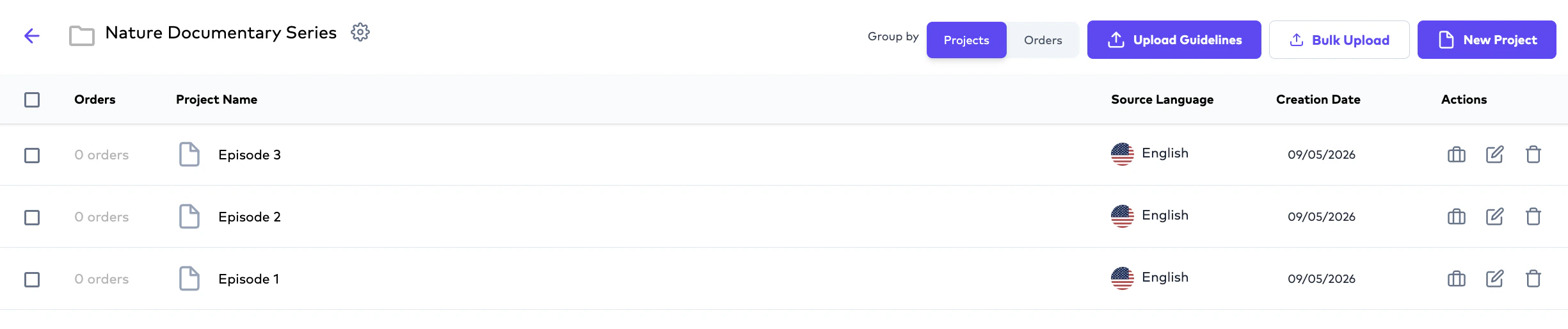
## Example Folder Structures
### Media Localization Example
```text theme={null}
Folder: Nature Documentary Series
├── Project: Episode 1
├── Project: Episode 2
├── Project: Episode 3
```

 ***
### Marketing Localization Example
```text theme={null}
Folder: Q4 Product Launch
├── Project: Product Demo Video
├── Project: Product Datasheet
├── Project: Training Material
```
***
### Legal Localization Example
```text theme={null}
Folder: International Compliance
├── Project: Privacy Policy
├── Project: Vendor Agreement
├── Project: Employee Handbook
```
***
# Folder-Level Notifications
Notification behavior operates primarily at the Folder level. When a Project Manager is assigned to a Folder:
* they receive notifications when orders inside the Folder are completed.
* the user who created the order also receives notifications.
This applies whether:
* the order was completed by AI,
* delivered by a linguist (In case of a Closed Captioning, Subtitle Translation, Document Translation or AI Dubbing order)
* delivered by a Vendor (In case of a Studio Dubbing order)
***
## Example Notification Workflow
```text theme={null}
Project Manager A assigned to Folder A
↓
Team Member B creates order
↓
Order completes
↓
Both users receive notification
```
***
# Folder Deletion Rules
Folders containing active or completed orders cannot currently be deleted.
This behavior exists to preserve:
* localization history,
* auditability,
* workflow traceability,
* and operational consistency.
***
# Projects
## What is a Project?
A Project represents:
* one primary source asset intended for localization.
The primary source asset acts as:
* the operational source of truth for localization workflows.
A Project may represent:
* a source video,
* a source audio file,
* or a source document.
***
# Primary Assets vs Supporting Assets
One of the most important concepts inside Ollang is the distinction between:
* the primary source asset,
* and supporting localization assets.
Every Project contains:
* one primary source asset,
but may additionally contain:
* subtitle files (SRT),
* source audio,
* M\&E files,
* glossaries,
* guideline documents,
* accessibility notes,
* or any relevant supporting localization documents for the project.
***
### Marketing Localization Example
```text theme={null}
Folder: Q4 Product Launch
├── Project: Product Demo Video
├── Project: Product Datasheet
├── Project: Training Material
```
***
### Legal Localization Example
```text theme={null}
Folder: International Compliance
├── Project: Privacy Policy
├── Project: Vendor Agreement
├── Project: Employee Handbook
```
***
# Folder-Level Notifications
Notification behavior operates primarily at the Folder level. When a Project Manager is assigned to a Folder:
* they receive notifications when orders inside the Folder are completed.
* the user who created the order also receives notifications.
This applies whether:
* the order was completed by AI,
* delivered by a linguist (In case of a Closed Captioning, Subtitle Translation, Document Translation or AI Dubbing order)
* delivered by a Vendor (In case of a Studio Dubbing order)
***
## Example Notification Workflow
```text theme={null}
Project Manager A assigned to Folder A
↓
Team Member B creates order
↓
Order completes
↓
Both users receive notification
```
***
# Folder Deletion Rules
Folders containing active or completed orders cannot currently be deleted.
This behavior exists to preserve:
* localization history,
* auditability,
* workflow traceability,
* and operational consistency.
***
# Projects
## What is a Project?
A Project represents:
* one primary source asset intended for localization.
The primary source asset acts as:
* the operational source of truth for localization workflows.
A Project may represent:
* a source video,
* a source audio file,
* or a source document.
***
# Primary Assets vs Supporting Assets
One of the most important concepts inside Ollang is the distinction between:
* the primary source asset,
* and supporting localization assets.
Every Project contains:
* one primary source asset,
but may additionally contain:
* subtitle files (SRT),
* source audio,
* M\&E files,
* glossaries,
* guideline documents,
* accessibility notes,
* or any relevant supporting localization documents for the project.
 ***
## Example Project Structure
```text theme={null}
Project: Product Demo Video
├── Primary Source Video
├── English SRT
├── M&E File
├── Brand Guidelines
├── Translation Glossary
```
The system treats:
* the primary video as the operational source of truth,
while all other assets function as:
* supporting operational references
**Note**: All the associated supporting operational project files goes into the context window of the agent (that has been selected from the workflow on the basis of the language pair) who will be processing the order.
***
# Multi-Asset Project Support
A Project may contain:
* both video and document assets,
* subtitle references,
* accessibility files,
* and additional localization materials simultaneously.
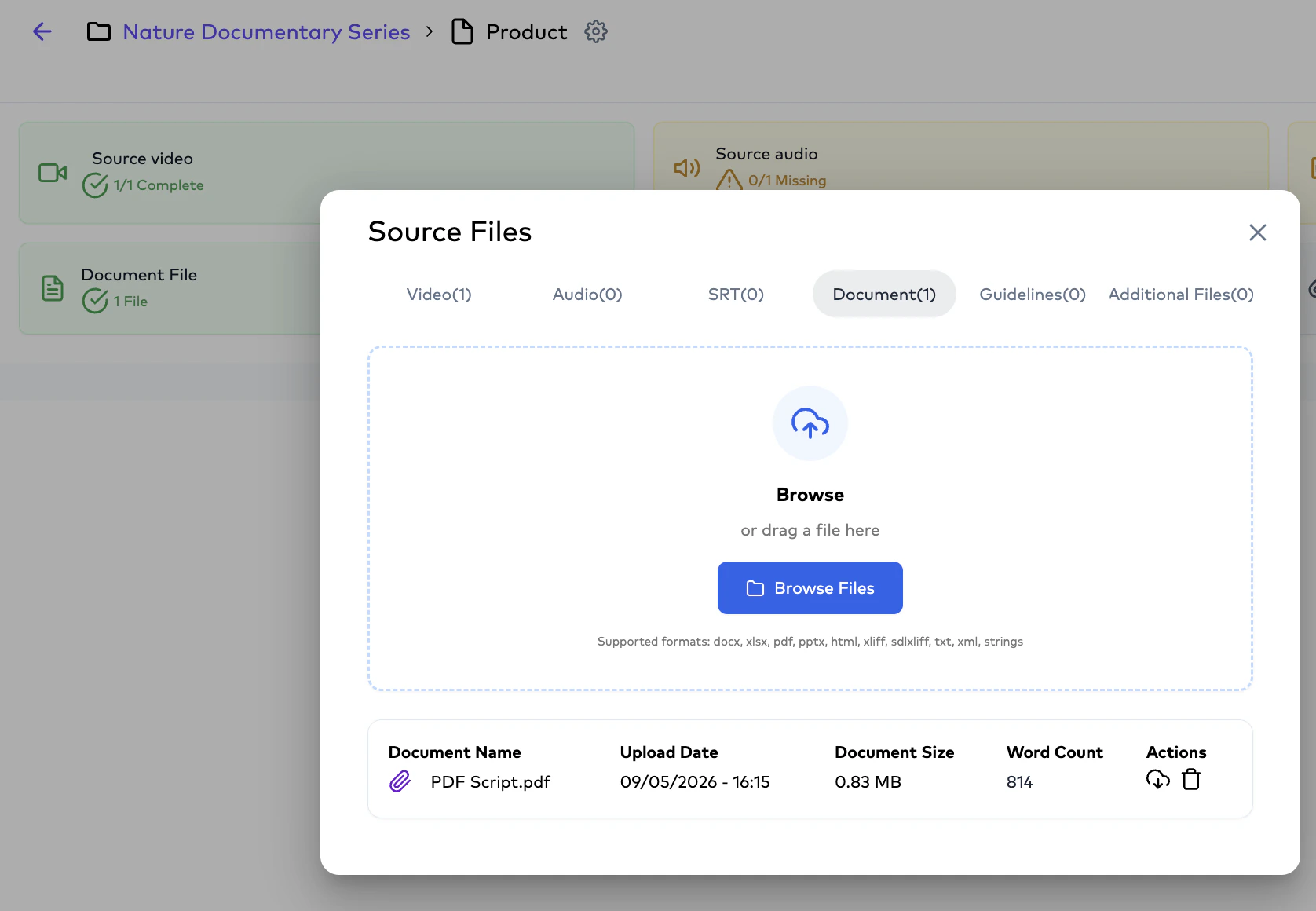
The order created by the user determines which asset becomes operationally relevant.
***
## Example
```text theme={null}
Project contains:
- Product Demo Video
- PDF Script
If user creates:
- Subtitle Translation Order → video becomes operational source.
- Document Translation Order → PDF becomes operational source
```
***
## Example Project Structure
```text theme={null}
Project: Product Demo Video
├── Primary Source Video
├── English SRT
├── M&E File
├── Brand Guidelines
├── Translation Glossary
```
The system treats:
* the primary video as the operational source of truth,
while all other assets function as:
* supporting operational references
**Note**: All the associated supporting operational project files goes into the context window of the agent (that has been selected from the workflow on the basis of the language pair) who will be processing the order.
***
# Multi-Asset Project Support
A Project may contain:
* both video and document assets,
* subtitle references,
* accessibility files,
* and additional localization materials simultaneously.
The order created by the user determines which asset becomes operationally relevant.
***
## Example
```text theme={null}
Project contains:
- Product Demo Video
- PDF Script
If user creates:
- Subtitle Translation Order → video becomes operational source.
- Document Translation Order → PDF becomes operational source
```
 ***
# Orders
## What is an Order?
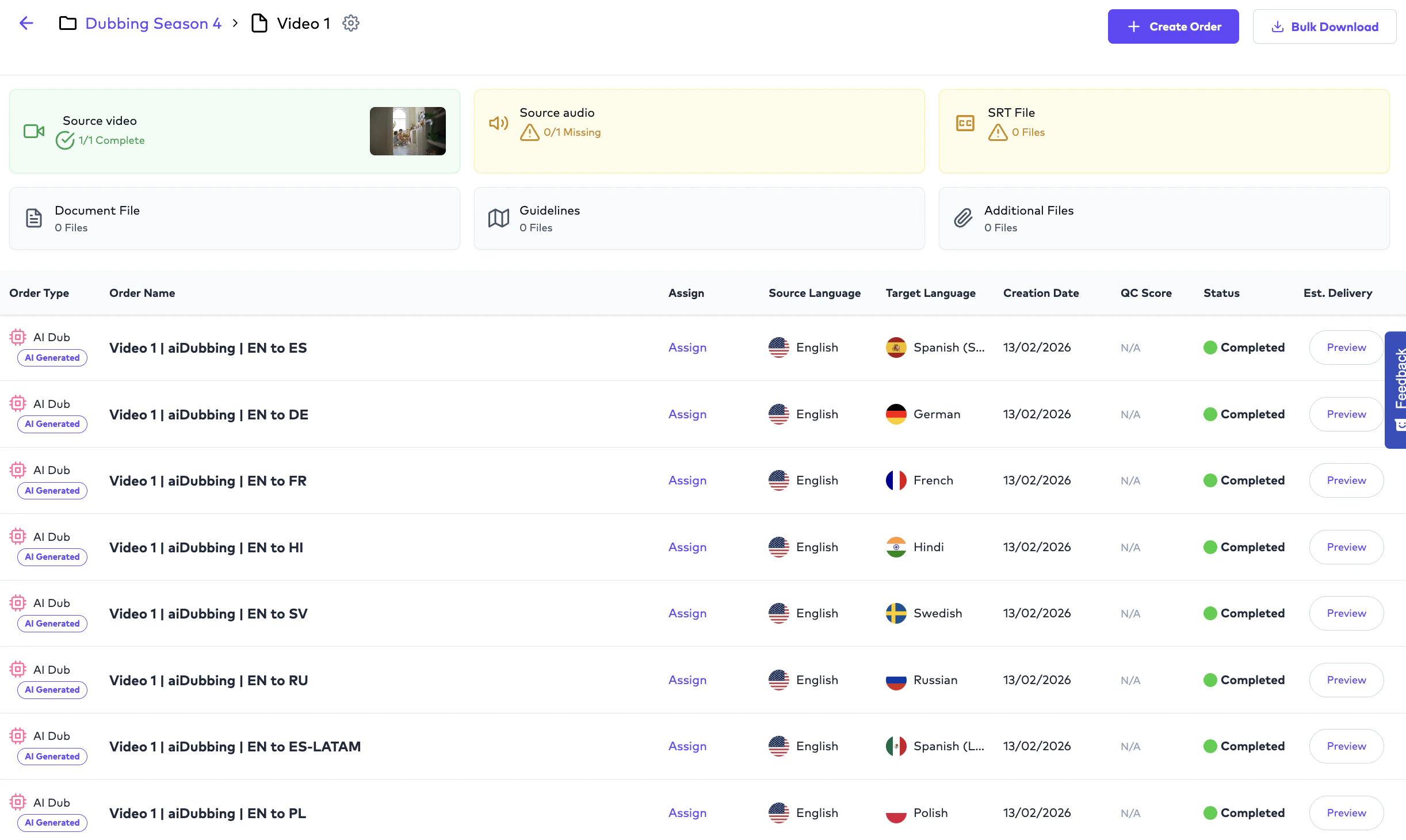
Orders are the actual localization processing jobs created from Projects.
A single Project can contain: one or multiple Orders simultaneously.
***
# Orders
## What is an Order?
Orders are the actual localization processing jobs created from Projects.
A single Project can contain: one or multiple Orders simultaneously.
 ***
# Example Order Structure
```text theme={null}
Project: Product Launch Video
├── CC Order (English)
├── Subtitle Translation (French)
├── Subtitle Translation (German)
├── AI Dubbing (French)
├── AI Dubbing (German)
```
Orders are independent operational units. Assignments, reruns, analytics, and deliverables all operate primarily at the Order level.
***
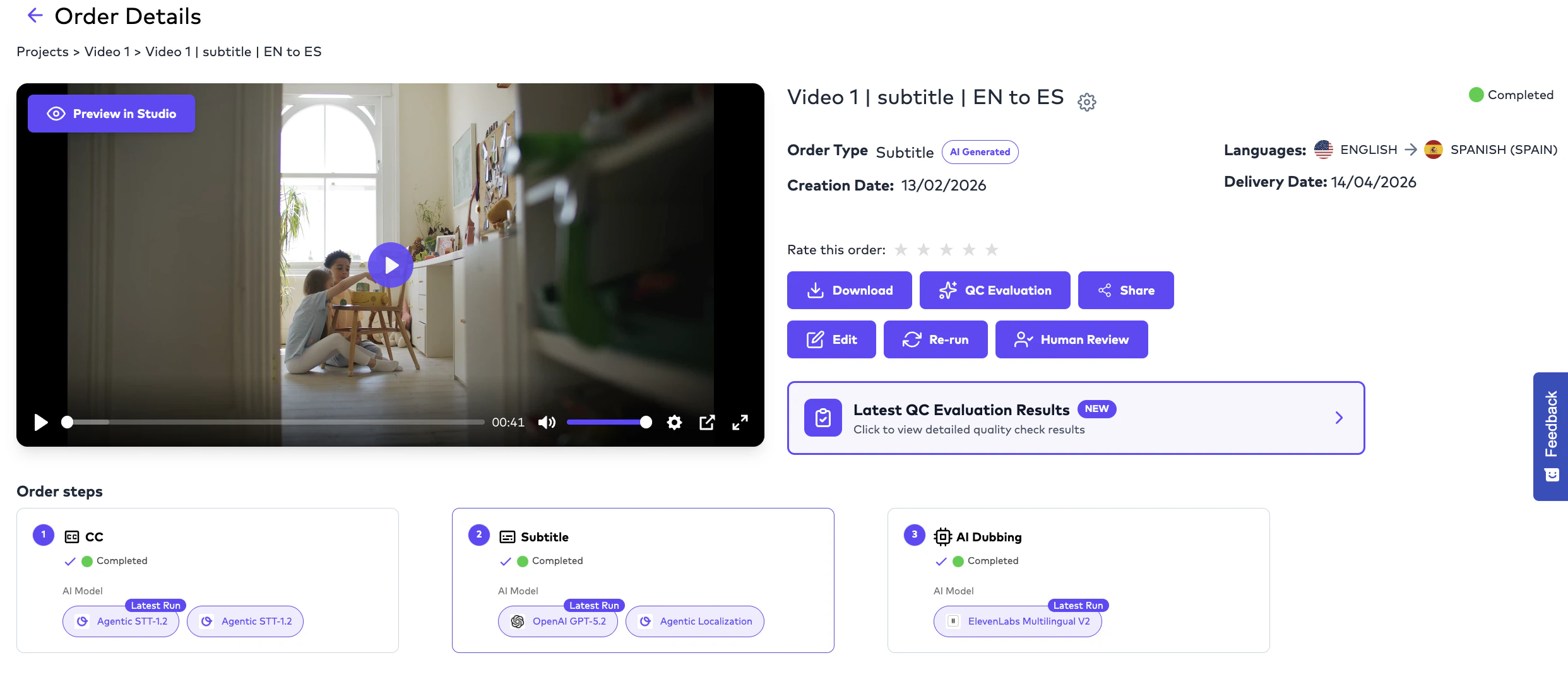
# Example Order Structure
```text theme={null}
Project: Product Launch Video
├── CC Order (English)
├── Subtitle Translation (French)
├── Subtitle Translation (German)
├── AI Dubbing (French)
├── AI Dubbing (German)
```
Orders are independent operational units. Assignments, reruns, analytics, and deliverables all operate primarily at the Order level.
 ***
# Typical Order Lifecycle
A Project Management User creates a localization order after configuring the workflow settings.
The platform processes transcription, translation, and dubbing workflows depending on the order type.
Orders may optionally be assigned to editors.
Assigned users edit, review, and refine the generated output.
Finalized outputs are delivered back into the Project Management Dashboard.
Deliverables become available for export in supported formats.
***
# Two Main Interfaces
The Ollang ecosystem operates through two interconnected operational environments.
Used for project organization, order creation, billing, analytics, workflow management, and operational visibility.
Used for subtitle editing, dubbing review, localization delivery, and assignment-based execution.
***
# Project Management Dashboard
The Project Management Dashboard is used for:
* creating localization orders,
* managing folders,
* organizing projects,
* configuring workflows,
* assigning teams,
* reviewing deliverables,
* and monitoring operations.
Project Management Users can generally view:
* all folders,
* all projects,
* and organizational workflow activity.
***
# Editor / LSP Interface
The Editor Interface is:
* assignment-scoped,
* and operationally focused.
Editors do not automatically see:
* all projects,
* all folders,
* or all organizational workflows.
Editors only see:
* explicitly assigned orders.
***
## Example Editor Visibility
```text theme={null}
Folder contains:
- 10 Projects
- 200 Orders
Editor assigned:
- 5 Orders
Result:
- Editor only sees those 5 assigned Orders.
```
***
# Example End-to-End Workflow
```text theme={null}
1. Project Manager uploads source video
↓
2. Subtitle Translation Order created
↓
3. AI generates initial translation
↓
4. Order assigned to an Editor (LSP Admin)
↓
5. Editor assigns Linguist
↓
6. Linguist edits subtitles
↓
7. Linguist delivers order
↓
8. Project Management Dashboard reflects final delivery
```
***
# Key Operational Concepts
Orders are treated as independent operational units. This allows different linguists, studios, or reviewers to work on different workflows under the same Project simultaneously.
Yes. A Folder can contain one, dozens, or hundreds of Projects depending on organizational needs.
Yes. A Project may contain supporting assets such as subtitle files, M\&E files, glossaries, and guideline documents in addition to the primary source asset.
No. Editors only see explicitly assigned Orders inside the Editor Interface.
***
# Typical Order Lifecycle
A Project Management User creates a localization order after configuring the workflow settings.
The platform processes transcription, translation, and dubbing workflows depending on the order type.
Orders may optionally be assigned to editors.
Assigned users edit, review, and refine the generated output.
Finalized outputs are delivered back into the Project Management Dashboard.
Deliverables become available for export in supported formats.
***
# Two Main Interfaces
The Ollang ecosystem operates through two interconnected operational environments.
Used for project organization, order creation, billing, analytics, workflow management, and operational visibility.
Used for subtitle editing, dubbing review, localization delivery, and assignment-based execution.
***
# Project Management Dashboard
The Project Management Dashboard is used for:
* creating localization orders,
* managing folders,
* organizing projects,
* configuring workflows,
* assigning teams,
* reviewing deliverables,
* and monitoring operations.
Project Management Users can generally view:
* all folders,
* all projects,
* and organizational workflow activity.
***
# Editor / LSP Interface
The Editor Interface is:
* assignment-scoped,
* and operationally focused.
Editors do not automatically see:
* all projects,
* all folders,
* or all organizational workflows.
Editors only see:
* explicitly assigned orders.
***
## Example Editor Visibility
```text theme={null}
Folder contains:
- 10 Projects
- 200 Orders
Editor assigned:
- 5 Orders
Result:
- Editor only sees those 5 assigned Orders.
```
***
# Example End-to-End Workflow
```text theme={null}
1. Project Manager uploads source video
↓
2. Subtitle Translation Order created
↓
3. AI generates initial translation
↓
4. Order assigned to an Editor (LSP Admin)
↓
5. Editor assigns Linguist
↓
6. Linguist edits subtitles
↓
7. Linguist delivers order
↓
8. Project Management Dashboard reflects final delivery
```
***
# Key Operational Concepts
Orders are treated as independent operational units. This allows different linguists, studios, or reviewers to work on different workflows under the same Project simultaneously.
Yes. A Folder can contain one, dozens, or hundreds of Projects depending on organizational needs.
Yes. A Project may contain supporting assets such as subtitle files, M\&E files, glossaries, and guideline documents in addition to the primary source asset.
No. Editors only see explicitly assigned Orders inside the Editor Interface.