> ## Documentation Index
> Fetch the complete documentation index at: https://api-docs.ollang.com/llms.txt
> Use this file to discover all available pages before exploring further.
# Teams, Permissions, and LSP Hierarchy
> Understand team structures, permissions, assignment visibility, operational hierarchy, and LSP workflows inside the Ollang Project Management Dashboard.
## Overview
The Ollang Project Management Dashboard supports:
* internal operational teams,
* external linguists,
* translation agencies,
* dubbing studios,
* and multi-layered localization workflows.
The platform separates operational users into:
* Project Management users,
* and Editor / LSP users.
This separation allows organizations to:
* control visibility,
* manage assignments,
* organize localization operations,
* and securely coordinate multilingual workflows.
***
# The Two Main Operational Environments
Used for operational oversight, order creation, billing, analytics, workflow management, and project organization.
Used for subtitle editing, dubbing review, translation operations, and assignment-based localization workflows.
# Team Invitation Types
Organizations can invite multiple operational user types.
Internal operational users working inside the Project Management Dashboard.
Linguists or reviewers working inside the Editor Interface.
External localization vendors managing multilingual operations.
Professional dubbing vendors handling voice production workflows.
***
# Project Management Users
## Overview
Project Management users operate inside:
* the Ollang Project Management Dashboard.
These users manage:
* Folders,
* Projects,
* Orders,
* assignments,
* billing,
* analytics,
* and workflow operations.
***
# Project Management Roles
The platform supports operational permission structures including:
* Owner
* Admin
* Project Manager
* Team Member
***
# Permission Structure
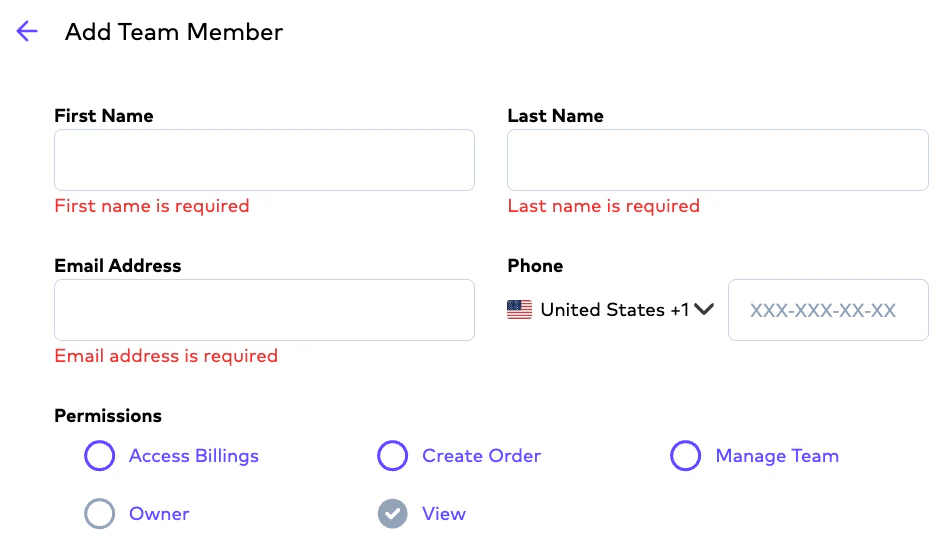
## Core Permissions
Permissions may include:
Allows users to create localization workflows and operational Orders.
Allows users to invite and manage operational users.
Allows users to view analytics, invoices, billing details, and payment-related operations.
Allows operational visibility into organizational workflows and Projects.
 ***
# Access Billing Clarification
Users with Access Billing permissions may view:
* invoices,
* analytics,
* payment information,
* and operational financial data.
However:
* general credit visibility remains visible operationally across workflows.
***
# Folder-Based Notification Logic
Notification behavior operates primarily at:
* Folder level.
Example:
```text theme={null}
Project Manager A assigned to Folder A
↓
Team Member B creates Order
↓
Order completes
↓
Both users receive notification
```
***
# Visibility Rules for Project Management Users
Project Management users generally have visibility into:
* all Folders,
* all Projects,
* and organizational workflows.
However:
* notification ownership operates through Folder assignment structures.
***
# Editor / LSP Users
## Overview
Editors and linguists operate inside:
* the Editor / LSP Interface.
These users focus on:
* subtitle editing,
* transcription review,
* dubbing workflows,
* translation refinement,
* and operational delivery.
***
# Important Visibility Rule
Editors do not see all Projects or organizational workflows.
Editors only see:
* explicitly assigned Orders.
Assignments operate primarily at:
* Order level, not:
* Project level.
***
# Example Assignment Visibility
```text theme={null}
Folder contains:
- 10 Projects
- 200 Orders
Editor assigned:
- 5 Orders
Result:
- Editor only sees assigned Orders.
```
***
# LSP Hierarchy
The platform supports a multi-level localization hierarchy.
```text theme={null}
LSP Admin (Editor)
↓
LSP Project Manager
↓
LSP Linguist
```
# LSP Admin
LSP Admins can:
* manage localization operations,
* assign Orders,
* onboard linguists,
* and coordinate multilingual workflows.
LSP Admins typically act as:
* operational vendor managers.
***
# LSP Project Manager
LSP Project Managers can:
* coordinate operational assignments,
* manage delivery pipelines,
* and oversee linguist workflows.
These users commonly manage:
* multilingual delivery operations,
* reviewer coordination,
* and operational execution.
***
# LSP Linguist
LSP Linguists:
* edit assigned Orders,
* refine localization output,
* and deliver finalized workflows.
They only see:
* Orders assigned to them.
***
# Translation Agencies and Dubbing Studios
## Overview
Translation Agencies and Dubbing Studios may:
* create internal users,
* assign operational tasks,
* and coordinate multilingual delivery pipelines.
This allows vendors to:
* manage their own operational structures inside Ollang.
***
# Studio Dubbing Vendor Workflows
Studio vendors may:
* upload dubbing vocals,
* upload final mixed outputs,
* upload Mixmaster files,
* and coordinate operational dubbing delivery.
However:
* delivery behavior depends on Order type.
***
# Important Studio Dubbing Rule
Studios cannot deliver isolated vocals-only files without sufficient operational audio structure.
Delivery workflows require:
* either final mixed outputs,
* or operationally compatible audio assets.
***
# Interface Switching
Project Management users may also:
* switch into the Editor Interface.
***
# Access Billing Clarification
Users with Access Billing permissions may view:
* invoices,
* analytics,
* payment information,
* and operational financial data.
However:
* general credit visibility remains visible operationally across workflows.
***
# Folder-Based Notification Logic
Notification behavior operates primarily at:
* Folder level.
Example:
```text theme={null}
Project Manager A assigned to Folder A
↓
Team Member B creates Order
↓
Order completes
↓
Both users receive notification
```
***
# Visibility Rules for Project Management Users
Project Management users generally have visibility into:
* all Folders,
* all Projects,
* and organizational workflows.
However:
* notification ownership operates through Folder assignment structures.
***
# Editor / LSP Users
## Overview
Editors and linguists operate inside:
* the Editor / LSP Interface.
These users focus on:
* subtitle editing,
* transcription review,
* dubbing workflows,
* translation refinement,
* and operational delivery.
***
# Important Visibility Rule
Editors do not see all Projects or organizational workflows.
Editors only see:
* explicitly assigned Orders.
Assignments operate primarily at:
* Order level, not:
* Project level.
***
# Example Assignment Visibility
```text theme={null}
Folder contains:
- 10 Projects
- 200 Orders
Editor assigned:
- 5 Orders
Result:
- Editor only sees assigned Orders.
```
***
# LSP Hierarchy
The platform supports a multi-level localization hierarchy.
```text theme={null}
LSP Admin (Editor)
↓
LSP Project Manager
↓
LSP Linguist
```
# LSP Admin
LSP Admins can:
* manage localization operations,
* assign Orders,
* onboard linguists,
* and coordinate multilingual workflows.
LSP Admins typically act as:
* operational vendor managers.
***
# LSP Project Manager
LSP Project Managers can:
* coordinate operational assignments,
* manage delivery pipelines,
* and oversee linguist workflows.
These users commonly manage:
* multilingual delivery operations,
* reviewer coordination,
* and operational execution.
***
# LSP Linguist
LSP Linguists:
* edit assigned Orders,
* refine localization output,
* and deliver finalized workflows.
They only see:
* Orders assigned to them.
***
# Translation Agencies and Dubbing Studios
## Overview
Translation Agencies and Dubbing Studios may:
* create internal users,
* assign operational tasks,
* and coordinate multilingual delivery pipelines.
This allows vendors to:
* manage their own operational structures inside Ollang.
***
# Studio Dubbing Vendor Workflows
Studio vendors may:
* upload dubbing vocals,
* upload final mixed outputs,
* upload Mixmaster files,
* and coordinate operational dubbing delivery.
However:
* delivery behavior depends on Order type.
***
# Important Studio Dubbing Rule
Studios cannot deliver isolated vocals-only files without sufficient operational audio structure.
Delivery workflows require:
* either final mixed outputs,
* or operationally compatible audio assets.
***
# Interface Switching
Project Management users may also:
* switch into the Editor Interface.
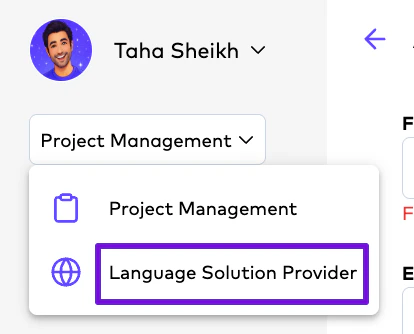
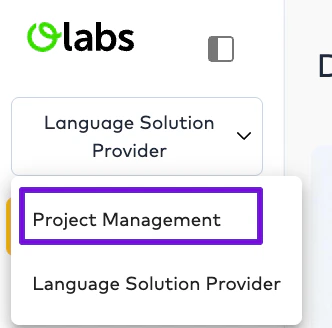 This allows:
* operational review,
* subtitle editing,
* dubbing review,
* and assignment-level editing workflows.
***
# Important Operational Clarification
A Project Management user switching into the Editor Interface only sees:
* Orders assigned to them operationally inside the Editor environment.
Visibility still operates through:
* Order-level assignment logic.
***
# Example Multi-Team Workflow
```text theme={null}
Project Manager creates AI Dubbing Order
↓
Order assigned to Translation Agency
↓
Agency Project Manager assigns Linguist
↓
Linguist edits subtitles
↓
Project Manager receives completed delivery
```
***
# Important Operational Notes
Yes. Organizations may onboard internal reviewers, agencies, editors, and dubbing studios.
No. Editors only see explicitly assigned Orders.
Yes. Agencies may create and manage their own operational users.
Yes. Studio workflows support uploaded dubbing assets and final delivery coordination.
Yes. Project Management users may access the Editor Interface for operational review workflows.
Assignments primarily operate at Order level.
This allows:
* operational review,
* subtitle editing,
* dubbing review,
* and assignment-level editing workflows.
***
# Important Operational Clarification
A Project Management user switching into the Editor Interface only sees:
* Orders assigned to them operationally inside the Editor environment.
Visibility still operates through:
* Order-level assignment logic.
***
# Example Multi-Team Workflow
```text theme={null}
Project Manager creates AI Dubbing Order
↓
Order assigned to Translation Agency
↓
Agency Project Manager assigns Linguist
↓
Linguist edits subtitles
↓
Project Manager receives completed delivery
```
***
# Important Operational Notes
Yes. Organizations may onboard internal reviewers, agencies, editors, and dubbing studios.
No. Editors only see explicitly assigned Orders.
Yes. Agencies may create and manage their own operational users.
Yes. Studio workflows support uploaded dubbing assets and final delivery coordination.
Yes. Project Management users may access the Editor Interface for operational review workflows.
Assignments primarily operate at Order level.