> ## Documentation Index
> Fetch the complete documentation index at: https://api-docs.ollang.com/llms.txt
> Use this file to discover all available pages before exploring further.
# Translation Readiness, Matching, and Context Assets
> How Ollang scores translation readiness, what full (exact) and fuzzy memory matches are, how glossaries and style guides count, how segments are classified for review, and how the Assets utilized card estimates billable review words.
## Overview
When you create an Order, Ollang can look at the source content together with the context assets you selected (Memories, Glossaries, Style Guides, guidelines) and tell you, before checkout, how much of the work is already covered by approved material. After the Order is translated, the same signals are recorded per segment as **evidence**, which drives the review classification and the human-review estimate shown on the Order details page.
This page explains every number you will see along the way:
* **Full (exact) match** and **fuzzy match** against a Memory
* **Glossary coverage** and **Style guide** availability
* The **Translation readiness** score and the suggested review policy
* **Segment classification** (auto-approved, review recommended, flagged)
* **Assets utilized**, evidence, and the **billable / words for review** estimate
Translation readiness is advisory. It never blocks checkout, never changes the
price you are quoted, and never rewrites your workflow's review settings by
itself. Use it to decide which assets to attach and how much human review to
plan for.
Readiness scoring, the context asset picker, and the Assets utilized card are
feature-gated. If you do not see them on the New Order or Order details pages,
contact your Ollang account manager to enable context management for your
workspace.
***
# Context assets
A **context asset** is any piece of approved material Ollang can ground a translation on. Each asset carries a *type*, a *scope level*, and a *selection source* that explains why it was used for a given Order.
| Asset type | What it holds | Scope levels |
| ----------------- | ----------------------------------------------------------- | -------------------------------- |
| `memory` | Translation memory: previously approved source/target pairs | Workspace |
| `glossary` | Approved terminology, including forbidden terms | Organization, workspace, project |
| `style_guide` | Document-wide style rules (tone, formatting, register) | Workspace, project |
| `instruction` | Global custom instructions | Workspace, project |
| `guideline_doc` | Folder- or project-level guideline documents | Project |
| `subtitle_config` | Subtitle formatting configuration | Project |
| Selection source | Shown in the UI as | Meaning |
| ---------------- | ------------------ | ------------------------------------------------------------------------------------------------------- |
| `explicit` | **Selected** | You picked the asset in the New Order form (or passed its ID to the API). |
| `resolved` | **Auto-resolved** | Ollang attached it automatically from the folder / project / workspace scope and language pair. |
| `legacy` | **Legacy** | Attached through an older mechanism (for example project guidelines defined before context management). |
Memories are **never** auto-attached: a Memory is only used when it is explicitly selected for the Order. Glossaries and Style Guides *are* auto-resolved from the project and workspace scope (glossaries additionally filtered by source language) unless you make an explicit selection, in which case your selection is authoritative.
For how to create and manage these assets, see [Memory, Guidelines, and Custom Instructions](/memory-guidelines-custom-instructions).
***
# Memory matching
Matching is performed **per segment**. A segment is one subtitle cue, one document paragraph / cell, or one line of the source text, depending on the Order type. Before comparing, both the source segment and every Memory entry are **normalized**:
```text theme={null}
1. lowercase
2. trim leading / trailing whitespace
3. collapse repeated whitespace to a single space
4. remove the punctuation characters . , ! ? ; :
```
So `"Save changes?"` and `"save changes"` are treated as the same text.
## Full (exact) match — "TM exact"
A segment is a **full match** when its normalized text is identical to the normalized source text of an entry in one of the selected Memories.
* Only *active* Memory items are considered; removed items are ignored.
* Each exact match is recorded as deterministic evidence of kind `tm_exact` with a match score of **1.0**.
* **TM exact coverage** = matched segments ÷ all non-empty source segments, as a percentage.
A full match is the strongest signal Ollang has: the segment already has an approved translation, so it needs the least (often no) human attention.
## Fuzzy match — "TM fuzzy"
Segments that did **not** get a full match are then compared against Memory entries using **token Dice similarity**: the two normalized texts are split into unique words and
```text theme={null}
similarity = 2 × |A ∩ B| / (|A| + |B|)
```
where `A` and `B` are the word sets of the source segment and the Memory entry. A segment counts as a **fuzzy match** when its best candidate reaches the **70 % similarity bar** (`0.7`).
```text theme={null}
Source : "Click Save to keep your changes"
Memory : "Click Save to keep the changes"
A = {click, save, to, keep, your, changes} (6 words)
B = {click, save, to, keep, the, changes} (6 words)
A ∩ B = {click, save, to, keep, changes} (5 words)
similarity = 2 × 5 / (6 + 6) = 0.83 → fuzzy match (≥ 0.70)
```
* **TM fuzzy coverage** = fuzzy-matched segments ÷ all non-empty source segments.
* Exact and fuzzy coverage are **disjoint**: a segment is either exact, fuzzy, or unmatched, so the two percentages can be added.
* If no segment reaches the bar, the readiness card explains why, for example *"No segment reached the 70% similarity bar — closest matches averaged 41%."*
A fuzzy match means an existing translation is close enough to be **reused with post-editing**. It is not a finished translation, which is why it receives partial credit in the readiness score (see below).
Matching scans a bounded number of Memory entries and source segments per
Order. Very large Memories or source files may report the `tm_scan_capped`
caveat, meaning coverage is a lower bound rather than an exhaustive count.
***
# Glossaries
Glossary terms are matched as **whole words or phrases** inside each source segment (so `add` does not match inside `address`), with Unicode-aware boundaries so that non-Latin scripts and scripts without spaces (Chinese, Japanese, Thai, …) match correctly.
Two different glossary percentages exist, and it helps to know which one you are looking at:
| Metric | Definition | Where it is used |
| ------------------------------- | ------------------------------------------------------------------------- | -------------------------------------- |
| **Glossary (segment coverage)** | Share of source segments that contain at least one approved glossary term | Readiness score (`glossary` component) |
| **Term coverage** | Share of the glossary's terms that appear somewhere in the document | Diagnostic shown on the readiness card |
Each term hit is recorded as deterministic evidence of kind `glossary_term`, including the source term, the target term, and whether the term is **forbidden**.
**Forbidden terms** are terms your glossary marks as *do not use*. When a forbidden term is present in the source:
* the readiness report adds the `forbidden_terms_present` caveat, and
* every segment containing it is **always flagged** for review, regardless of any other score.
***
# Style guides
A Style Guide contains rules that apply to the **whole document** (tone, register, formatting, capitalization, …) rather than to individual segments, so there is no meaningful per-segment coverage percentage for it. Readiness therefore only reports **availability**:
* a Style Guide is attached → the style component is **100 %**
* no Style Guide is attached → **Not available** (0 %)
Guideline documents, custom instructions, and subtitle configuration are resolved and listed alongside Style Guides in the Assets utilized card, but do not contribute to the readiness score.
***
# Translation readiness score
The **Translation readiness** card on the New Order form combines all the signals above into a single **0–100** confidence score. It is computed asynchronously: the card creates a readiness report, polls until it is `completed`, and then shows the breakdown.
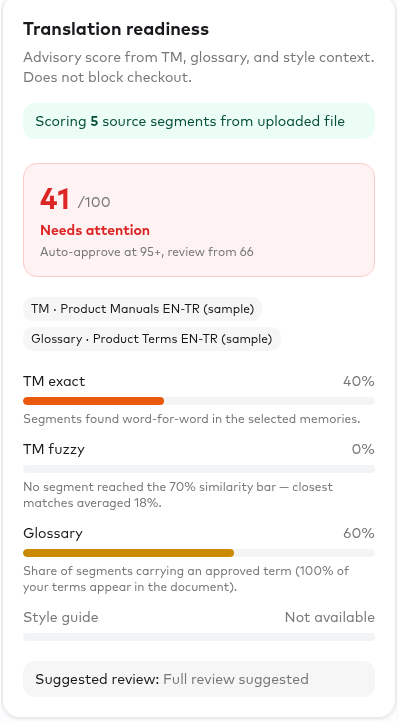 ## Inputs
| Component | Weight | Value used |
| --------------------- | -------- | ------------------------------------------------------------------------------------------------------------------------------ |
| Translation memory | **0.55** | *combined TM coverage* = TM exact % + TM fuzzy % × **0.6** (clamped to 0–100) |
| Glossary | **0.15** | glossary segment coverage % |
| Style guide | **0.10** | 100 if a Style Guide is attached, otherwise 0 |
| Historical automation | **0.20** | 100 − average human-edit % on your previous Orders (defaults to **50** until at least 3 completed Orders with edit data exist) |
```text theme={null}
readiness = 0.55 × (exact% + 0.6 × fuzzy%)
+ 0.15 × glossary%
+ 0.10 × (styleGuide ? 100 : 0)
+ 0.20 × historicalAutomation
```
The result is rounded and clamped to 0–100.
**Worked example** — the card above: 5 source segments, 2 exact matches (40 %), no fuzzy matches (0 %), 3 segments carrying an approved glossary term (60 %), no Style Guide, no order history yet:
```text theme={null}
TM combined = 40 + 0.6 × 0 = 40
readiness = 0.55 × 40 = 22.0
+ 0.15 × 60 = 9.0
+ 0.10 × 0 = 0.0
+ 0.20 × 50 = 10.0
------------------------------
41 → "Needs attention"
```
Attaching a Style Guide would add 10 points; one fuzzy match (20 %) would add 0.55 × 0.6 × 20 ≈ 6.6 more.
The fuzzy credit of 0.6 reflects that a fuzzy match is reusable but still needs post-editing. The card also shows the combined TM figure so that the breakdown reconciles with the headline score.
## Bands and suggested review policy
The score is mapped onto the same classification thresholds that are later used for segment classification, so what you see before the Order and after the Order line up:
| Score (defaults) | Label | Suggested review policy |
| ---------------- | ------------------ | -------------------------------------------------------------- |
| **95 – 100** | Ready | `ai_only_spot_check` — AI translation with a spot check |
| **66 – 94** | Review recommended | `review_recommended` — standard human review after translation |
| **0 – 65** | Needs attention | `full_review` — full human review after translation |
Thresholds are configurable per workflow (see [Review Gates](/review-gates)); the readiness report records the thresholds that were actually used. The suggested policy is a recommendation only. Ollang does not change your review nodes automatically.
## Caveats
The report lists caveats that qualify the number:
| Caveat | Meaning |
| ------------------------- | ------------------------------------------------------------------------------------------------------------------------------------------------ |
| `no_source_text` | No text could be extracted from the source, so TM and glossary matching could not run. The score is forced to **0** even if assets are attached. |
| `tm_scan_capped` | The Memory / source scan hit its size cap; coverage is a lower bound. |
| `forbidden_terms_present` | The source contains glossary terms marked as forbidden. |
The report also records its *content availability*: `full_text` when source segments were available for matching, `counts_only` when only source document URLs were supplied and the text still had to be fetched and parsed server-side, and `none` when nothing could be read (which produces the `no_source_text` caveat).
The card also tells you what to add to raise a low score (for example attach a Memory for this language pair, or a Style Guide).
***
# Segment classification after translation
Once the Order is translated, each segment is scored from the evidence recorded for it and classified into one of three review buckets.
| Evidence on the segment | Segment score |
| ----------------------------------------------------------- | ---------------------------------- |
| Exact Memory match (`tm_exact`) | **100** |
| Fuzzy Memory match (`tm_fuzzy`) | the fuzzy similarity (e.g. 83) |
| Glossary term only (`glossary_term`) | **70** |
| Glossary term *in addition to* a non-perfect TM / AI signal | **+5** bonus, capped at 100 |
| AI-reported confidence only (`ai_reported`) | the AI confidence for that segment |
| Forbidden glossary term present | always **flagged** |
| Segment score (defaults) | Classification |
| ------------------------ | ---------------------- |
| ≥ 95 | **Auto-approved** |
| 66 – 94 | **Review recommended** |
| \< 66 | **Flagged** |
The classification thresholds are the same `autoApproveMinScore` / `reviewMinScore` pair used for the readiness bands. The counts of segments in each bucket are what the Assets utilized card summarises as the **review classification roll-up**.
***
# Assets utilized
The **Assets utilized** card on the Order details page (Project Management → Order) shows, after translation, which context assets actually influenced the Order and how much of the content is grounded in them.
## Inputs
| Component | Weight | Value used |
| --------------------- | -------- | ------------------------------------------------------------------------------------------------------------------------------ |
| Translation memory | **0.55** | *combined TM coverage* = TM exact % + TM fuzzy % × **0.6** (clamped to 0–100) |
| Glossary | **0.15** | glossary segment coverage % |
| Style guide | **0.10** | 100 if a Style Guide is attached, otherwise 0 |
| Historical automation | **0.20** | 100 − average human-edit % on your previous Orders (defaults to **50** until at least 3 completed Orders with edit data exist) |
```text theme={null}
readiness = 0.55 × (exact% + 0.6 × fuzzy%)
+ 0.15 × glossary%
+ 0.10 × (styleGuide ? 100 : 0)
+ 0.20 × historicalAutomation
```
The result is rounded and clamped to 0–100.
**Worked example** — the card above: 5 source segments, 2 exact matches (40 %), no fuzzy matches (0 %), 3 segments carrying an approved glossary term (60 %), no Style Guide, no order history yet:
```text theme={null}
TM combined = 40 + 0.6 × 0 = 40
readiness = 0.55 × 40 = 22.0
+ 0.15 × 60 = 9.0
+ 0.10 × 0 = 0.0
+ 0.20 × 50 = 10.0
------------------------------
41 → "Needs attention"
```
Attaching a Style Guide would add 10 points; one fuzzy match (20 %) would add 0.55 × 0.6 × 20 ≈ 6.6 more.
The fuzzy credit of 0.6 reflects that a fuzzy match is reusable but still needs post-editing. The card also shows the combined TM figure so that the breakdown reconciles with the headline score.
## Bands and suggested review policy
The score is mapped onto the same classification thresholds that are later used for segment classification, so what you see before the Order and after the Order line up:
| Score (defaults) | Label | Suggested review policy |
| ---------------- | ------------------ | -------------------------------------------------------------- |
| **95 – 100** | Ready | `ai_only_spot_check` — AI translation with a spot check |
| **66 – 94** | Review recommended | `review_recommended` — standard human review after translation |
| **0 – 65** | Needs attention | `full_review` — full human review after translation |
Thresholds are configurable per workflow (see [Review Gates](/review-gates)); the readiness report records the thresholds that were actually used. The suggested policy is a recommendation only. Ollang does not change your review nodes automatically.
## Caveats
The report lists caveats that qualify the number:
| Caveat | Meaning |
| ------------------------- | ------------------------------------------------------------------------------------------------------------------------------------------------ |
| `no_source_text` | No text could be extracted from the source, so TM and glossary matching could not run. The score is forced to **0** even if assets are attached. |
| `tm_scan_capped` | The Memory / source scan hit its size cap; coverage is a lower bound. |
| `forbidden_terms_present` | The source contains glossary terms marked as forbidden. |
The report also records its *content availability*: `full_text` when source segments were available for matching, `counts_only` when only source document URLs were supplied and the text still had to be fetched and parsed server-side, and `none` when nothing could be read (which produces the `no_source_text` caveat).
The card also tells you what to add to raise a low score (for example attach a Memory for this language pair, or a Style Guide).
***
# Segment classification after translation
Once the Order is translated, each segment is scored from the evidence recorded for it and classified into one of three review buckets.
| Evidence on the segment | Segment score |
| ----------------------------------------------------------- | ---------------------------------- |
| Exact Memory match (`tm_exact`) | **100** |
| Fuzzy Memory match (`tm_fuzzy`) | the fuzzy similarity (e.g. 83) |
| Glossary term only (`glossary_term`) | **70** |
| Glossary term *in addition to* a non-perfect TM / AI signal | **+5** bonus, capped at 100 |
| AI-reported confidence only (`ai_reported`) | the AI confidence for that segment |
| Forbidden glossary term present | always **flagged** |
| Segment score (defaults) | Classification |
| ------------------------ | ---------------------- |
| ≥ 95 | **Auto-approved** |
| 66 – 94 | **Review recommended** |
| \< 66 | **Flagged** |
The classification thresholds are the same `autoApproveMinScore` / `reviewMinScore` pair used for the readiness bands. The counts of segments in each bucket are what the Assets utilized card summarises as the **review classification roll-up**.
***
# Assets utilized
The **Assets utilized** card on the Order details page (Project Management → Order) shows, after translation, which context assets actually influenced the Order and how much of the content is grounded in them.
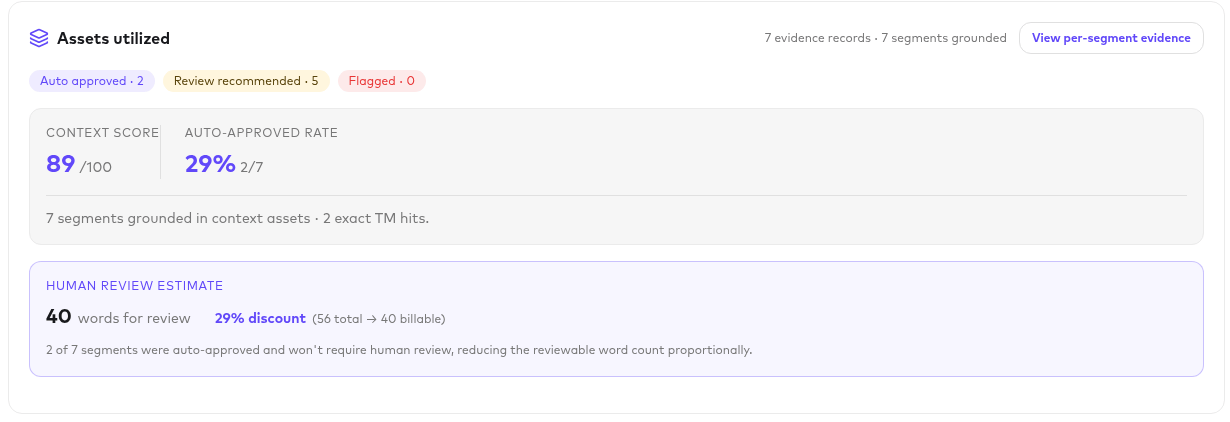 For each asset it lists:
* **Name and type** (Memory, Glossary, Style guide, Instruction, Guideline document, Subtitle config)
* **Version** of the asset at the time of the Order, and its **scope level**
* **Selection source**: Selected, Auto-resolved, or Legacy
* **Evidence count**: how many individual matches were recorded against this asset
* **Grounded segments**: how many distinct segments have at least one match from this asset
Below the assets you see the usage summary:
* total evidence records and the number of segments with any evidence
* evidence by kind (`tm_exact`, `tm_fuzzy`, `glossary_term`, `style_rule`, `instruction`, `ai_reported`)
* the **review classification roll-up**: auto-approved / review recommended / flagged counts
* the overall **AI confidence** reported by the translation pipeline and the **context score**
Every segment can be opened to inspect its evidence: which Memory entry or glossary term matched, the match score, and the AI justification where available.
For each asset it lists:
* **Name and type** (Memory, Glossary, Style guide, Instruction, Guideline document, Subtitle config)
* **Version** of the asset at the time of the Order, and its **scope level**
* **Selection source**: Selected, Auto-resolved, or Legacy
* **Evidence count**: how many individual matches were recorded against this asset
* **Grounded segments**: how many distinct segments have at least one match from this asset
Below the assets you see the usage summary:
* total evidence records and the number of segments with any evidence
* evidence by kind (`tm_exact`, `tm_fuzzy`, `glossary_term`, `style_rule`, `instruction`, `ai_reported`)
* the **review classification roll-up**: auto-approved / review recommended / flagged counts
* the overall **AI confidence** reported by the translation pipeline and the **context score**
Every segment can be opened to inspect its evidence: which Memory entry or glossary term matched, the match score, and the AI justification where available.
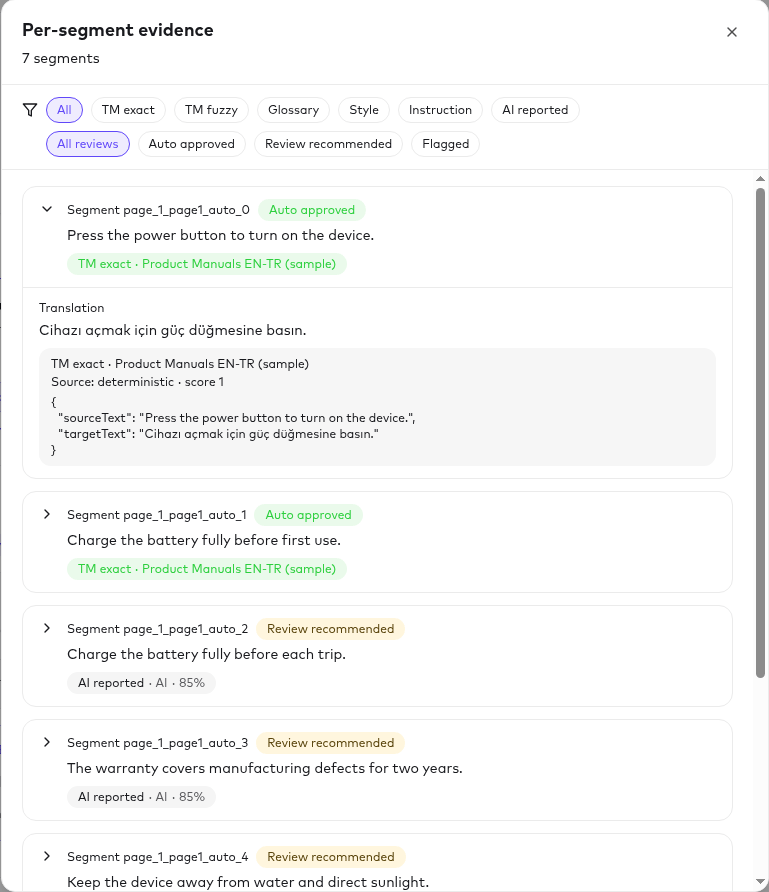 Deterministic evidence (`tm_exact`, `glossary_term`) is produced by Ollang's
matching services and is exact. `ai_reported` evidence is the confidence the
translation model reported for that segment; it is stored separately, is not
counted as an "asset", and is shown with its justification so you can judge it.
## Human review estimate and billable words
The card ends with a **Human review estimate** that translates the classification roll-up into words:
```text theme={null}
words for review = round( totalWords × (1 − autoApproved / totalClassified) )
```
and displays it as ` total → billable`.
For example, an Order of 10,000 words where 6,200 of 8,000 classified segments were auto-approved shows:
```text theme={null}
10,000 × (1 − 6,200 / 8,000) = 2,250 words for review
(10,000 total → 2,250 billable)
```
How to read this:
* It is a **proportional estimate**: the auto-approved share of *segments* is applied to the *word count*; it does not sum the exact word counts of the non-auto-approved segments.
* "Billable" here refers to the words you should plan to pay a human reviewer for (in-house or LSP). It is **not** the Order's price: the Order was quoted and charged at checkout, and this estimate does not change that quote, the credits consumed, or any invoice.
* Use it to size a [Review Gate](/review-gates) assignment or an LSP purchase order, and compare it against the pre-order readiness score to check that your assets are paying off.
***
# Putting it together
On the New Order form, select the Memories you want to reuse. Glossaries and
Style Guides for the project and language pair are auto-resolved; adjust the
selection if needed.
Check TM exact / fuzzy coverage, glossary coverage, and style-guide
availability. Follow the card's suggestions (attach a Memory, add a Style
Guide) if the score is low. Readiness is advisory and does not block checkout.
Use the suggested review policy to configure the workflow's Review Gate:
spot check for "Ready", standard review for "Review recommended", full
review for "Needs attention".
After translation, confirm which assets were used, inspect flagged segments,
and use the human review estimate to plan reviewer effort.
Approved reviews grow your Memories, which raises exact/fuzzy coverage, the
historical-automation component, and future readiness scores.
***
# Quick reference
| Term | Short definition |
| -------------------------------------------- | -------------------------------------------------------------------------------------------------------------- |
| Full / exact match | Normalized source segment identical to a Memory entry; score 100 |
| Fuzzy match | Best Memory entry with token Dice similarity ≥ 0.70; score = similarity |
| TM combined coverage | exact % + 0.6 × fuzzy % |
| Glossary coverage | % of segments containing an approved glossary term |
| Term coverage | % of glossary terms appearing in the document (diagnostic) |
| Style guide availability | 100 % if a Style Guide is attached, otherwise not available |
| Historical automation | 100 − average human-edit % over previous Orders (default 50) |
| Translation readiness | 0.55·TM + 0.15·Glossary + 0.10·Style + 0.20·History, 0–100, advisory |
| Auto-approved / Review recommended / Flagged | Segment classification at ≥ 95 / ≥ 66 / \< 66 (configurable) |
| Assets utilized | Assets with recorded evidence on the Order, with version, scope, selection source, evidence and segment counts |
| Words for review ("billable") | totalWords × (1 − autoApproved ÷ totalClassified); a review-planning estimate, not the Order price |
Deterministic evidence (`tm_exact`, `glossary_term`) is produced by Ollang's
matching services and is exact. `ai_reported` evidence is the confidence the
translation model reported for that segment; it is stored separately, is not
counted as an "asset", and is shown with its justification so you can judge it.
## Human review estimate and billable words
The card ends with a **Human review estimate** that translates the classification roll-up into words:
```text theme={null}
words for review = round( totalWords × (1 − autoApproved / totalClassified) )
```
and displays it as ` total → billable`.
For example, an Order of 10,000 words where 6,200 of 8,000 classified segments were auto-approved shows:
```text theme={null}
10,000 × (1 − 6,200 / 8,000) = 2,250 words for review
(10,000 total → 2,250 billable)
```
How to read this:
* It is a **proportional estimate**: the auto-approved share of *segments* is applied to the *word count*; it does not sum the exact word counts of the non-auto-approved segments.
* "Billable" here refers to the words you should plan to pay a human reviewer for (in-house or LSP). It is **not** the Order's price: the Order was quoted and charged at checkout, and this estimate does not change that quote, the credits consumed, or any invoice.
* Use it to size a [Review Gate](/review-gates) assignment or an LSP purchase order, and compare it against the pre-order readiness score to check that your assets are paying off.
***
# Putting it together
On the New Order form, select the Memories you want to reuse. Glossaries and
Style Guides for the project and language pair are auto-resolved; adjust the
selection if needed.
Check TM exact / fuzzy coverage, glossary coverage, and style-guide
availability. Follow the card's suggestions (attach a Memory, add a Style
Guide) if the score is low. Readiness is advisory and does not block checkout.
Use the suggested review policy to configure the workflow's Review Gate:
spot check for "Ready", standard review for "Review recommended", full
review for "Needs attention".
After translation, confirm which assets were used, inspect flagged segments,
and use the human review estimate to plan reviewer effort.
Approved reviews grow your Memories, which raises exact/fuzzy coverage, the
historical-automation component, and future readiness scores.
***
# Quick reference
| Term | Short definition |
| -------------------------------------------- | -------------------------------------------------------------------------------------------------------------- |
| Full / exact match | Normalized source segment identical to a Memory entry; score 100 |
| Fuzzy match | Best Memory entry with token Dice similarity ≥ 0.70; score = similarity |
| TM combined coverage | exact % + 0.6 × fuzzy % |
| Glossary coverage | % of segments containing an approved glossary term |
| Term coverage | % of glossary terms appearing in the document (diagnostic) |
| Style guide availability | 100 % if a Style Guide is attached, otherwise not available |
| Historical automation | 100 − average human-edit % over previous Orders (default 50) |
| Translation readiness | 0.55·TM + 0.15·Glossary + 0.10·Style + 0.20·History, 0–100, advisory |
| Auto-approved / Review recommended / Flagged | Segment classification at ≥ 95 / ≥ 66 / \< 66 (configurable) |
| Assets utilized | Assets with recorded evidence on the Order, with version, scope, selection source, evidence and segment counts |
| Words for review ("billable") | totalWords × (1 − autoApproved ÷ totalClassified); a review-planning estimate, not the Order price |