> ## Documentation Index
> Fetch the complete documentation index at: https://api-docs.ollang.com/llms.txt
> Use this file to discover all available pages before exploring further.
# Workflows and Provider Architecture
> Understand workflow configuration, provider orchestration, language-pair logic, and AI provider selection inside the Ollang Project Management Dashboard.
## Overview
Workflows inside the Ollang Project Management Dashboard determine:
* how Orders are processed,
* which providers are used,
* which AI models are selected,
* how language pairs are configured,
* and how localization pipelines operate.
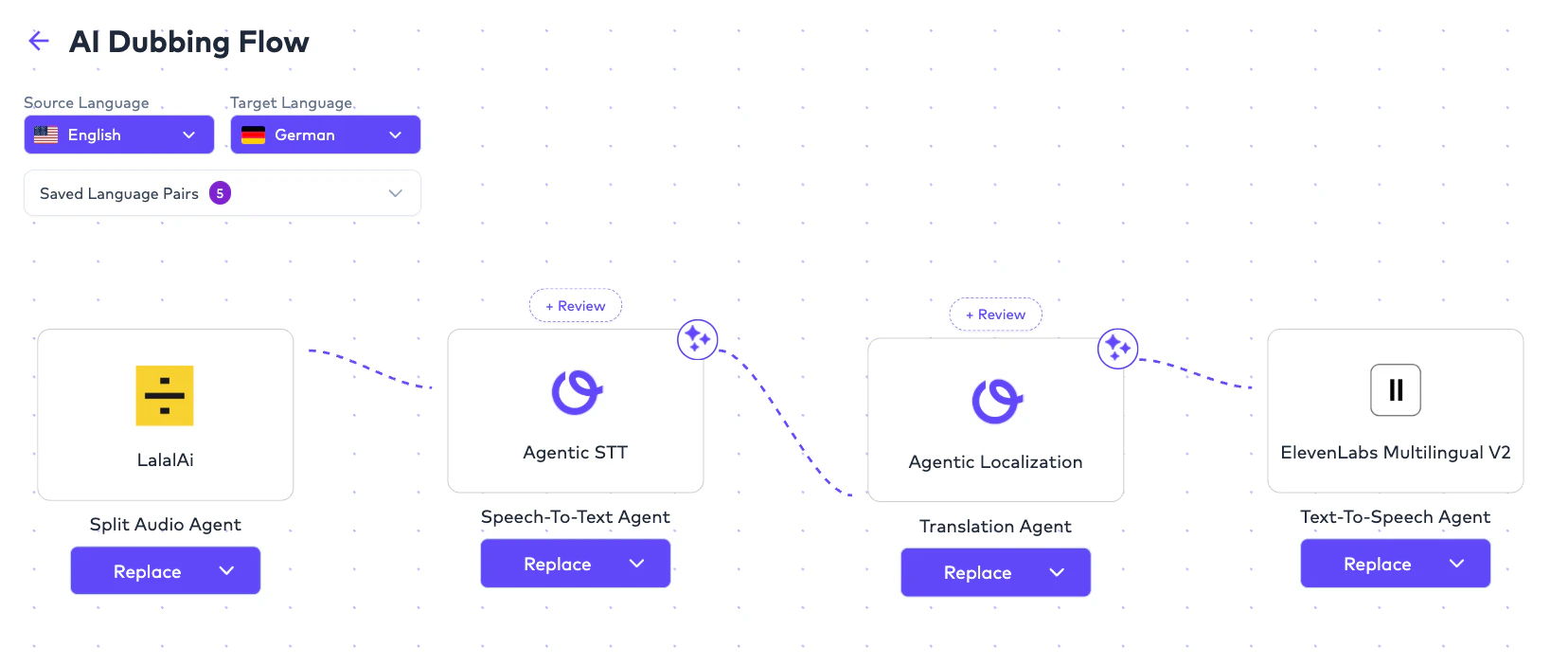
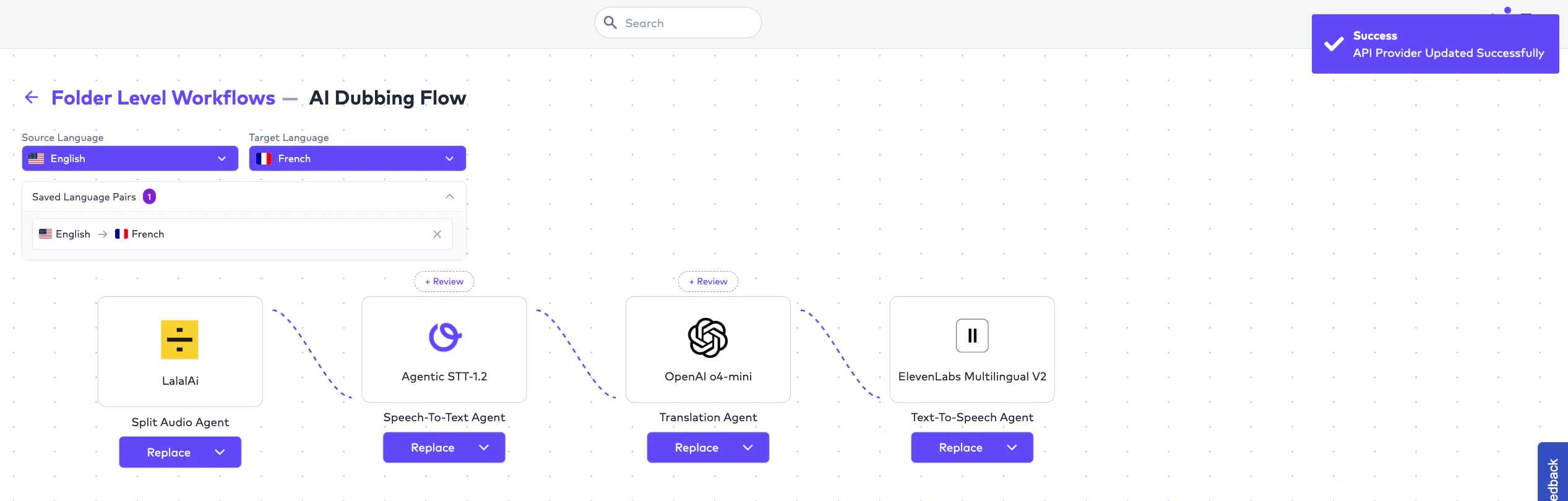
A Workflow is a reusable operational configuration that defines how localization should happen for a specific language pair.
Example:
```text theme={null}
English → French
CC / Transcription:
Ollang Agentic
Subtitle Translation:
OpenAI
AI Dubbing:
Gemini TTS
```
This allows organizations to:
* standardize localization workflows,
* benchmark provider quality,
* optimize costs,
* and maintain consistency across multilingual operations.
***
# What is a Workflow?
A Workflow is a reusable configuration that determines:
* which providers are used,
* which language pair is localized,
* how localization is processed,
* and how Orders are operationalized.
Instead of manually selecting providers every time, organizations can:
* preconfigure workflows,
* reuse them across Orders,
* and standardize operational quality.
 # Workflow Scope
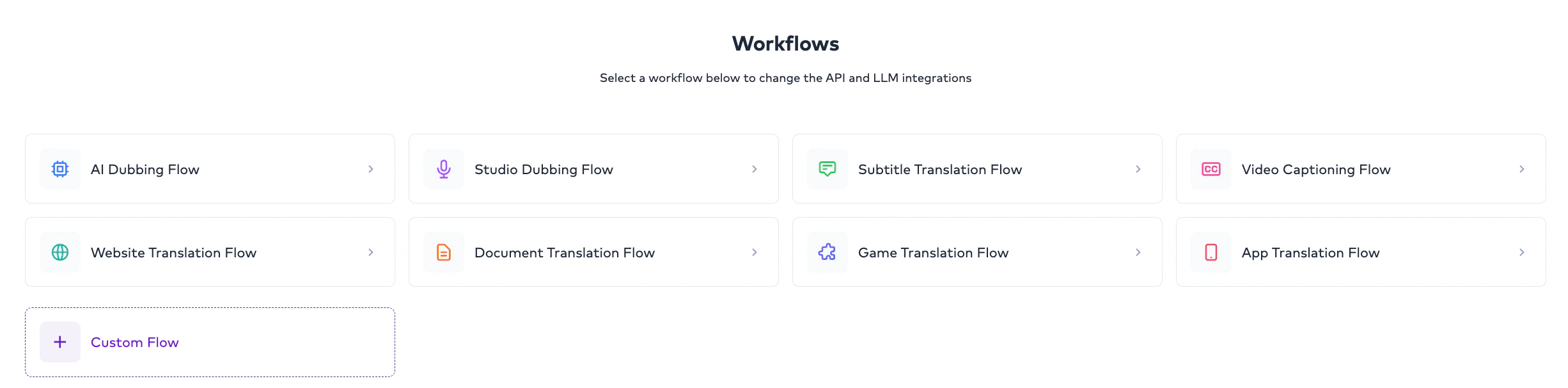
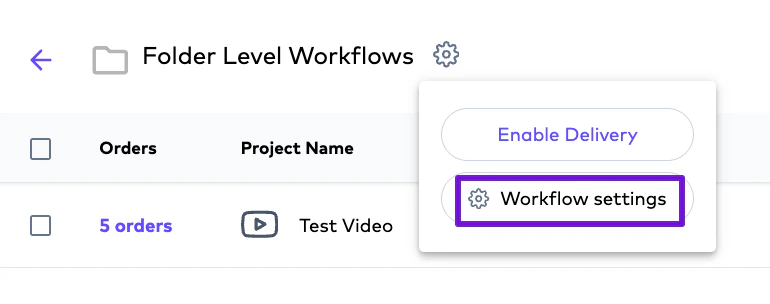
Workflows can currently be configured at:
Default workflow configuration applied across the organization.
Folder-specific workflow configuration overriding global settings.
Project-level workflows are not currently supported. Workflows can be configured globally or at the Folder level.
***
# Global Workflows
## Overview
Global workflows act as:
* organization-wide default workflows.
These workflows automatically apply when:
* no Folder-level workflow exists.
Example:
```text theme={null}
Global Workflow
English → French
CC:
Ollang Agentic
Subtitle Translation:
OpenAI
AI Dubbing:
ElevenLabs
```
This becomes:
* the operational default for all applicable Orders.
***
# Folder-Level Workflows
## Overview
Folder-level workflows allow teams to configure localization differently for specific operational use cases.
This is useful when:
* different teams require different providers,
* different content types require different quality standards,
* or experimentation is needed.
Example:
```text theme={null}
Folder A
English → French
CC:
Speechmatics
Subtitles:
Open AI
AI Dubbing:
Gemini
```
```text theme={null}
Folder B
English → French
CC:
Ollang Agentic
Subtitles:
Ollang Agentic
AI Dubbing:
ElevenLabs
```
Even though:
* the language pair is identical,
the workflow may differ depending on:
* operational requirements,
* content type,
* and quality expectations.
# Workflow Scope
Workflows can currently be configured at:
Default workflow configuration applied across the organization.
Folder-specific workflow configuration overriding global settings.
Project-level workflows are not currently supported. Workflows can be configured globally or at the Folder level.
***
# Global Workflows
## Overview
Global workflows act as:
* organization-wide default workflows.
These workflows automatically apply when:
* no Folder-level workflow exists.
Example:
```text theme={null}
Global Workflow
English → French
CC:
Ollang Agentic
Subtitle Translation:
OpenAI
AI Dubbing:
ElevenLabs
```
This becomes:
* the operational default for all applicable Orders.
***
# Folder-Level Workflows
## Overview
Folder-level workflows allow teams to configure localization differently for specific operational use cases.
This is useful when:
* different teams require different providers,
* different content types require different quality standards,
* or experimentation is needed.
Example:
```text theme={null}
Folder A
English → French
CC:
Speechmatics
Subtitles:
Open AI
AI Dubbing:
Gemini
```
```text theme={null}
Folder B
English → French
CC:
Ollang Agentic
Subtitles:
Ollang Agentic
AI Dubbing:
ElevenLabs
```
Even though:
* the language pair is identical,
the workflow may differ depending on:
* operational requirements,
* content type,
* and quality expectations.
 # Workflow Override Logic
Folder-level workflows always override:
* Global workflows.
Hierarchy:
```text theme={null}
Folder-Level Workflow
↓
Global Workflow
```
Example:
```text theme={null}
Global:
English → French → Provider A
Folder:
English → French → Provider B
```
Result:
```text theme={null}
Folder Workflow is used.
```
***
# Workflow Architecture by Order Type
Different workflows can be configured independently for different localization stages.
Supported workflow categories include:
Speech-to-text and caption generation workflow.
Translation workflow for multilingual subtitle localization.
Voice synthesis workflow including Lip Sync and Audio Description.
Localization workflow for structured and document-based content.
Workflow coordination for studio-managed dubbing operations.
***
# Multiple Workflows for the Same Language Pair
Organizations may configure multiple workflows for the same language pair across different Folders.
Example:
```text theme={null}
Folder A
English → French
CC: Ollang Agentic
Subtitles: Provider A
Dubbing: Gemini
```
```text theme={null}
Folder B
English → French
CC: Speechmatics
Subtitles: Provider B
Dubbing: ElevenLabs
```
This enables:
* benchmarking,
* experimentation,
* quality optimization,
* and use-case-specific localization.
***
# Provider Architecture
## Overview
Ollang acts as an orchestration layer. Rather than forcing a single provider, the platform enables organizations to:
* choose providers,
* benchmark providers,
* compare results,
* and optimize workflows.
This creates operational flexibility because:
```text theme={null}
The best provider today
may not be the best provider tomorrow.
```
Organizations can continuously optimize workflows based on:
* quality,
* cost,
* speed,
* and content type.
***
# Speech-to-Text (STT) Providers
Speech-to-text providers are commonly used for:
* Video Captioning,
* transcription,
* subtitle generation,
* and speaker diarization.
Supported examples include:
Recommended orchestration-first workflow optimized for flexibility.
Commonly used for multilingual speech recognition.
Speech-to-text provider for transcription workflows.
Enterprise-oriented transcription workflow option.
***
# Translation Providers
Translation providers are used for:
* subtitle translation,
* document translation,
* multilingual localization,
* and AI-assisted language generation.
Examples include:
Recommended orchestration workflow for multilingual localization.
LLM-based multilingual translation workflows.
Translation workflow for reasoning-intensive localization tasks.
Multilingual translation and contextual language generation.
***
# Text-to-Speech (TTS) Providers
TTS providers are used for:
* AI Dubbing,
* Audio Description,
* voice synthesis,
* and multilingual speech generation.
Supported examples include:
Commonly used for multilingual voice generation and dubbing workflows.
Used for controllable voice prompting and expressive delivery.
Enterprise voice synthesis option.
***
# Workflow Lifecycle
## Important Operational Rule
Workflow updates only affect future Orders.
Already-created Orders:
* remain unchanged,
* preserve their operational workflow,
* and continue using the workflow selected at Order creation.
***
# AI Quality Benchmarking
Organizations commonly benchmark providers using:
* AI QC Evaluation,
* Human QC Annotation,
* analytics,
* and localization performance tracking.
This helps teams understand:
```text theme={null}
Which provider works best
for which language pair,
content type,
or workflow.
```
Because the AI ecosystem evolves rapidly:
```text theme={null}
The best-performing provider today
may not remain the best tomorrow.
```
The platform is intentionally designed for:
* experimentation,
* optimization,
* and provider flexibility.
***
# Example Enterprise Workflow
```text theme={null}
English → French
CC:
Ollang Agentic
Subtitle Translation:
OpenAI
AI Dubbing:
Gemini TTS
QC Evaluation:
Enabled
```
***
# Example Multi-Folder Benchmarking
```text theme={null}
Folder A → Marketing Content
English → French
Dubbing: Gemini
```
```text theme={null}
Folder B → Entertainment Content
English → French
Dubbing: ElevenLabs
```
Teams can later compare:
* localization quality,
* human edit percentage,
* QC outcomes,
* and operational performance.
***
# Important Operational Notes
No. Workflows can currently be configured at Global level and Folder level only.
Yes. Folder-level workflows always take precedence.
Yes. Different Folders may use different workflows for the same language pair.
No. Workflow updates only affect future Orders.
Yes. Different workflow stages can use different providers.
No. Ollang acts as an orchestration layer and allows organizations to choose providers based on operational goals.
# Workflow Override Logic
Folder-level workflows always override:
* Global workflows.
Hierarchy:
```text theme={null}
Folder-Level Workflow
↓
Global Workflow
```
Example:
```text theme={null}
Global:
English → French → Provider A
Folder:
English → French → Provider B
```
Result:
```text theme={null}
Folder Workflow is used.
```
***
# Workflow Architecture by Order Type
Different workflows can be configured independently for different localization stages.
Supported workflow categories include:
Speech-to-text and caption generation workflow.
Translation workflow for multilingual subtitle localization.
Voice synthesis workflow including Lip Sync and Audio Description.
Localization workflow for structured and document-based content.
Workflow coordination for studio-managed dubbing operations.
***
# Multiple Workflows for the Same Language Pair
Organizations may configure multiple workflows for the same language pair across different Folders.
Example:
```text theme={null}
Folder A
English → French
CC: Ollang Agentic
Subtitles: Provider A
Dubbing: Gemini
```
```text theme={null}
Folder B
English → French
CC: Speechmatics
Subtitles: Provider B
Dubbing: ElevenLabs
```
This enables:
* benchmarking,
* experimentation,
* quality optimization,
* and use-case-specific localization.
***
# Provider Architecture
## Overview
Ollang acts as an orchestration layer. Rather than forcing a single provider, the platform enables organizations to:
* choose providers,
* benchmark providers,
* compare results,
* and optimize workflows.
This creates operational flexibility because:
```text theme={null}
The best provider today
may not be the best provider tomorrow.
```
Organizations can continuously optimize workflows based on:
* quality,
* cost,
* speed,
* and content type.
***
# Speech-to-Text (STT) Providers
Speech-to-text providers are commonly used for:
* Video Captioning,
* transcription,
* subtitle generation,
* and speaker diarization.
Supported examples include:
Recommended orchestration-first workflow optimized for flexibility.
Commonly used for multilingual speech recognition.
Speech-to-text provider for transcription workflows.
Enterprise-oriented transcription workflow option.
***
# Translation Providers
Translation providers are used for:
* subtitle translation,
* document translation,
* multilingual localization,
* and AI-assisted language generation.
Examples include:
Recommended orchestration workflow for multilingual localization.
LLM-based multilingual translation workflows.
Translation workflow for reasoning-intensive localization tasks.
Multilingual translation and contextual language generation.
***
# Text-to-Speech (TTS) Providers
TTS providers are used for:
* AI Dubbing,
* Audio Description,
* voice synthesis,
* and multilingual speech generation.
Supported examples include:
Commonly used for multilingual voice generation and dubbing workflows.
Used for controllable voice prompting and expressive delivery.
Enterprise voice synthesis option.
***
# Workflow Lifecycle
## Important Operational Rule
Workflow updates only affect future Orders.
Already-created Orders:
* remain unchanged,
* preserve their operational workflow,
* and continue using the workflow selected at Order creation.
***
# AI Quality Benchmarking
Organizations commonly benchmark providers using:
* AI QC Evaluation,
* Human QC Annotation,
* analytics,
* and localization performance tracking.
This helps teams understand:
```text theme={null}
Which provider works best
for which language pair,
content type,
or workflow.
```
Because the AI ecosystem evolves rapidly:
```text theme={null}
The best-performing provider today
may not remain the best tomorrow.
```
The platform is intentionally designed for:
* experimentation,
* optimization,
* and provider flexibility.
***
# Example Enterprise Workflow
```text theme={null}
English → French
CC:
Ollang Agentic
Subtitle Translation:
OpenAI
AI Dubbing:
Gemini TTS
QC Evaluation:
Enabled
```
***
# Example Multi-Folder Benchmarking
```text theme={null}
Folder A → Marketing Content
English → French
Dubbing: Gemini
```
```text theme={null}
Folder B → Entertainment Content
English → French
Dubbing: ElevenLabs
```
Teams can later compare:
* localization quality,
* human edit percentage,
* QC outcomes,
* and operational performance.
***
# Important Operational Notes
No. Workflows can currently be configured at Global level and Folder level only.
Yes. Folder-level workflows always take precedence.
Yes. Different Folders may use different workflows for the same language pair.
No. Workflow updates only affect future Orders.
Yes. Different workflow stages can use different providers.
No. Ollang acts as an orchestration layer and allows organizations to choose providers based on operational goals.