

Overview
The Ollang Project Management Dashboard supports complex localization workflows involving:- video files
- audio files
- subtitle srt files
- document files
- localization resource files
- guideline and reference materials
Primary Source Assets vs Supporting Assets
Primary Source Asset
A primary source asset is the main file that will be localized. Examples:- a video/audio file for Video Captioning, Subtitle Translation, or AI Dubbing
- a document file for Document Translation
Supporting Assets
Supporting assets provide additional context or operational input for localization workflows. Examples:- SRT or VTT subtitle references
- M&E files
- source audio
- glossaries
- brand guidelines
- voice instructions
- accessibility notes
- reference translations
- additional documents
A Project may contain multiple supporting assets, but the selected Order type determines which asset becomes operationally relevant.
Example Project Asset Structure
- the source video is the primary asset
- the SRT supports subtitle timing and translation
- the M&E file supports dubbing workflows
- the glossary and brand guidelines support consistency
Supported Video and Audio Upload Formats
The following video and audio formats are supported:.mov
Commonly used for source video localization workflows.
.mp4
Commonly used for video captioning, subtitle translation, and dubbing workflows.
.wav
Commonly used for audio-based dubbing, transcription, and voice workflows.
.mp3
Commonly used for audio upload, transcription, and voice-related workflows.
Supported Document Upload Formats
The following document and localization file formats are supported:.docx
.pptx
.xlsx
.html
.xliff
.sdlxliff
.json
.po
.txt
.srt
.vtt
.pages
.key
.numbers
- office document translation
- website and HTML localization
- software localization
- structured resource file localization
- multilingual documentation workflows
Structured Localization Files
Ollang supports structured localization formats such as:- XLIFF
- SDLXLIFF
- JSON
- PO
- HTML
- SRT
- VTT
- localization teams
- product teams
- engineering teams
- SaaS companies
- enterprise content teams
Subtitle and Caption Assets
Subtitle and caption files can be used as:- primary assets for subtitle-based workflows
- supporting references for video workflows
- timing references for dubbing workflows
.srt.vtt
Example
M&E Files
What is an M&E File?
M&E stands for Music and Effects. An M&E file contains:- background music
- environmental audio
- sound effects
- non-dialogue audio elements
- AI Dubbing
- Studio Dubbing
- vocal replacement workflows
- professional audio mixing workflows
Why M&E Files Matter
During dubbing workflows, original vocals may be replaced with localized vocals. M&E files help preserve the non-dialogue parts of the original media, such as:- background music
- crowd noise
- room tone
- sound effects
- environmental sounds
Example Dubbing Workflow with M&E
If a project already has a clean M&E file, it can help improve dubbing and mixing workflows.
Guideline Documents
Guideline documents provide instructions that help AI workflows, linguists, editors, and vendors produce consistent output. Guidelines may include:- subtitle style guides
- brand tone instructions
- terminology rules
- voice direction
- accessibility rules
- formatting preferences
- market-specific localization requirements
Example
Hierarchy in which the Guidelines are applied to your orders
- Custom Instructions represent global guidelines that are automatically applied to Orders when no folder-level or project-level guidelines are configured.
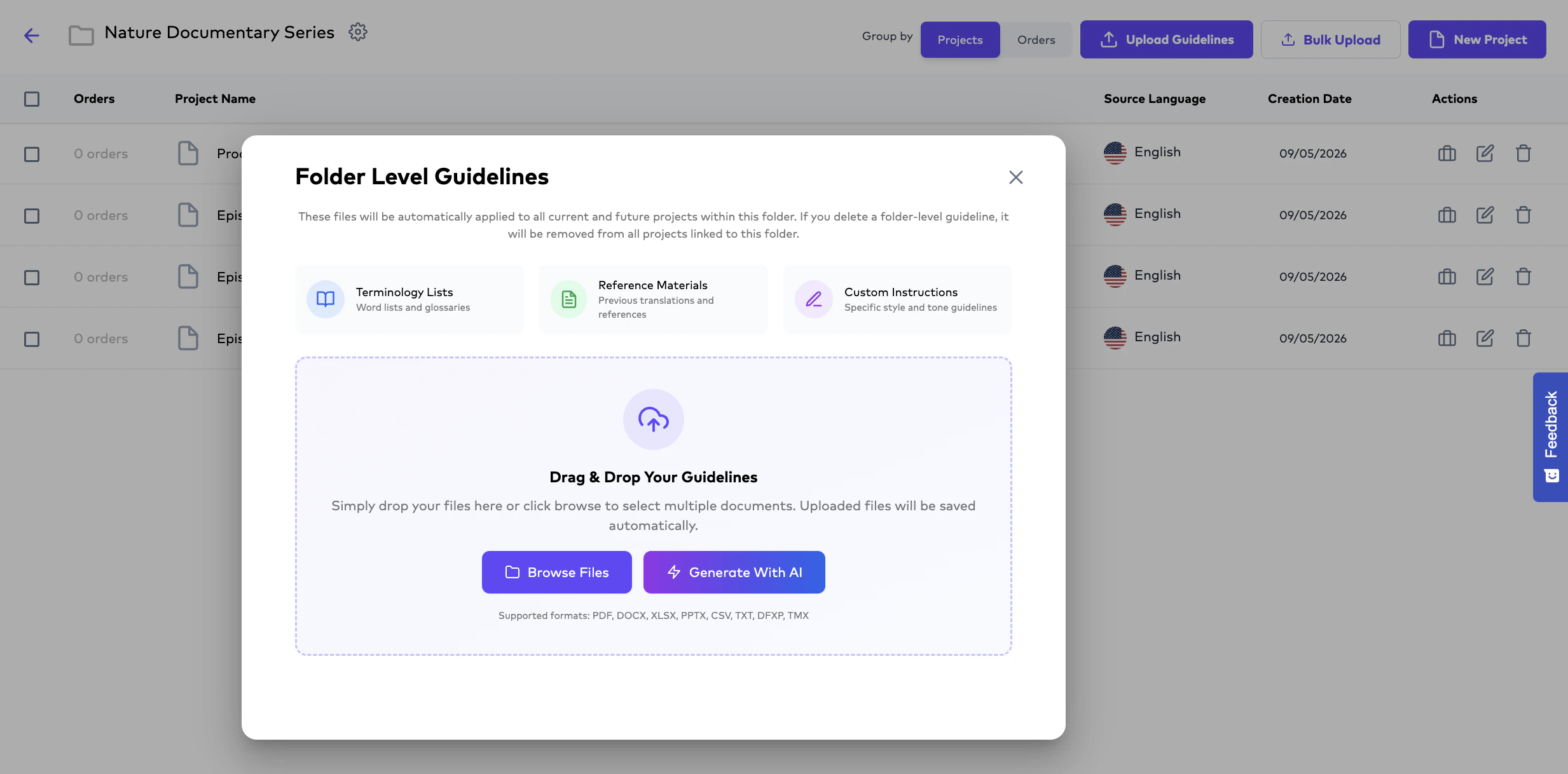
- Folder-level Guidelines represent instructions uploaded to a specific Folder and are automatically applied to all Orders within that Folder unless project-level guidelines are configured.
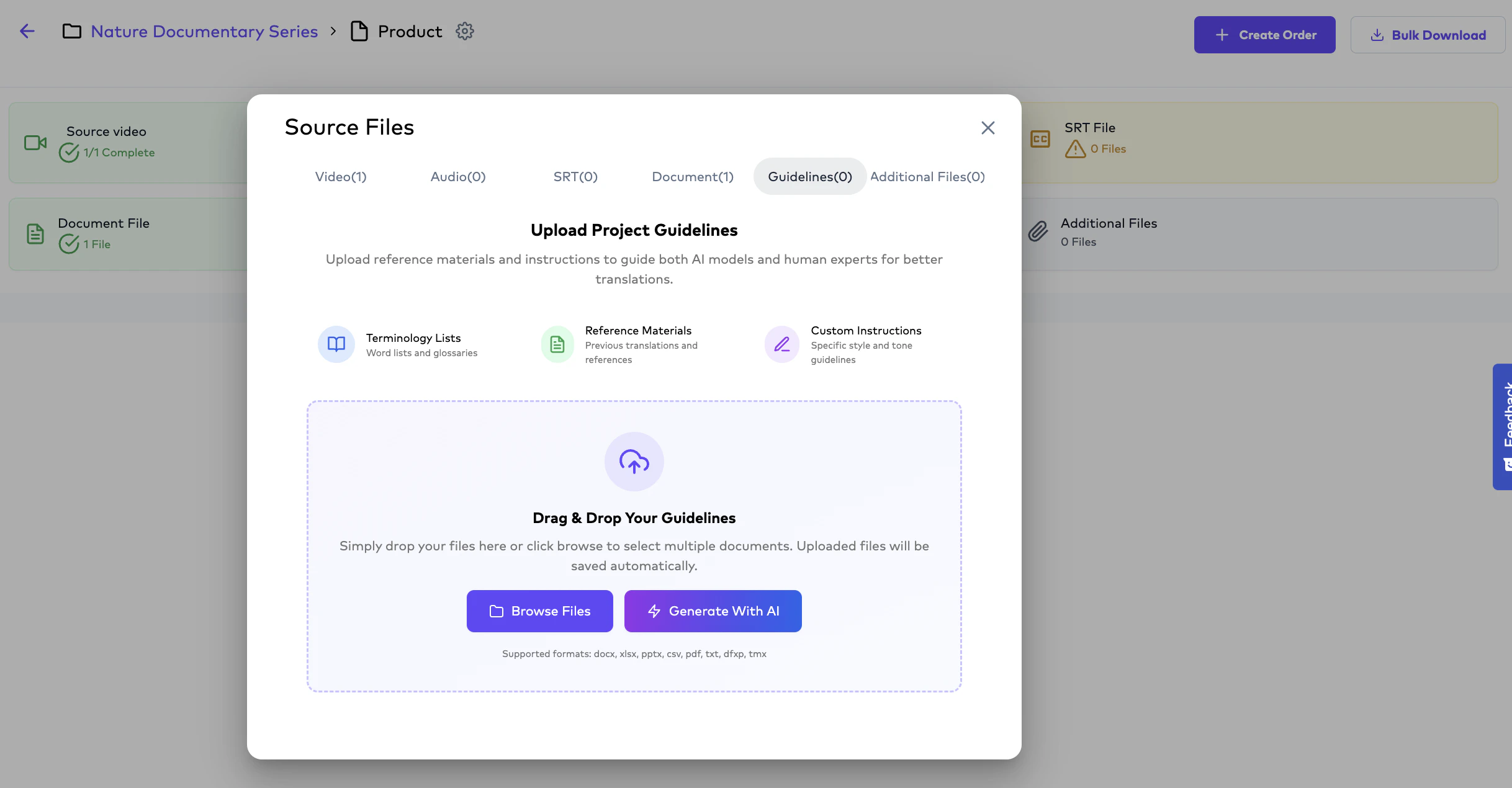
- Project-level Guidelines represent instructions uploaded to a specific Project and are automatically applied to all Orders within that Project, overriding folder-level and global guidelines when configured.
Glossaries and Terminology References
Glossaries help preserve terminology consistency across multilingual workflows. They are useful for:- product names
- brand terms
- medical terminology
- legal terminology
- UI terms
- recurring phrases
- approved translations
- enterprise localization
- SaaS localization
- legal translation
- healthcare content
- multilingual product operations
Accessibility Assets
Accessibility-related assets may include:- audio description instructions
- accessibility style guides
- screen-reader guidance
- narration tone notes
- compliance requirements
- scene description references
- Audio Description
- captioning
- subtitle accessibility
- inclusive media localization
Bulk Upload Workflows
Bulk Upload workflows allow Project Management Users to upload multiple files into a Folder for scalable project creation and localization management.Bulk uploads are especially useful for:
- Episodic content,
- Large multilingual campaigns,
- Media libraries,
- Enterprise localization operations,
- and high-volume content onboarding.
The platform supports two different bulk upload methods:
Single File Upload
Upload individual source files to create Projects one at a time.
Bulk Project Upload
Upload multiple structured folders simultaneously to automatically create multiple Projects with associated assets.
Single File Upload Workflow
Project Management Users may upload:- a single video,
- audio file,
- subtitle file,
- or document
- one new Project.
- subtitles,
- M&E files,
- glossaries,
- guidelines,
- or supporting documentation
Bulk Project Upload Workflow
Overview
The platform also supports structured bulk project creation using:- predefined folder naming conventions.
- dozens or hundreds of folders simultaneously,
- Projects,
- associated source files,
- and supporting localization assets.
- episodic media,
- multilingual production pipelines,
- enterprise-scale localization operations,
- and high-volume onboarding.
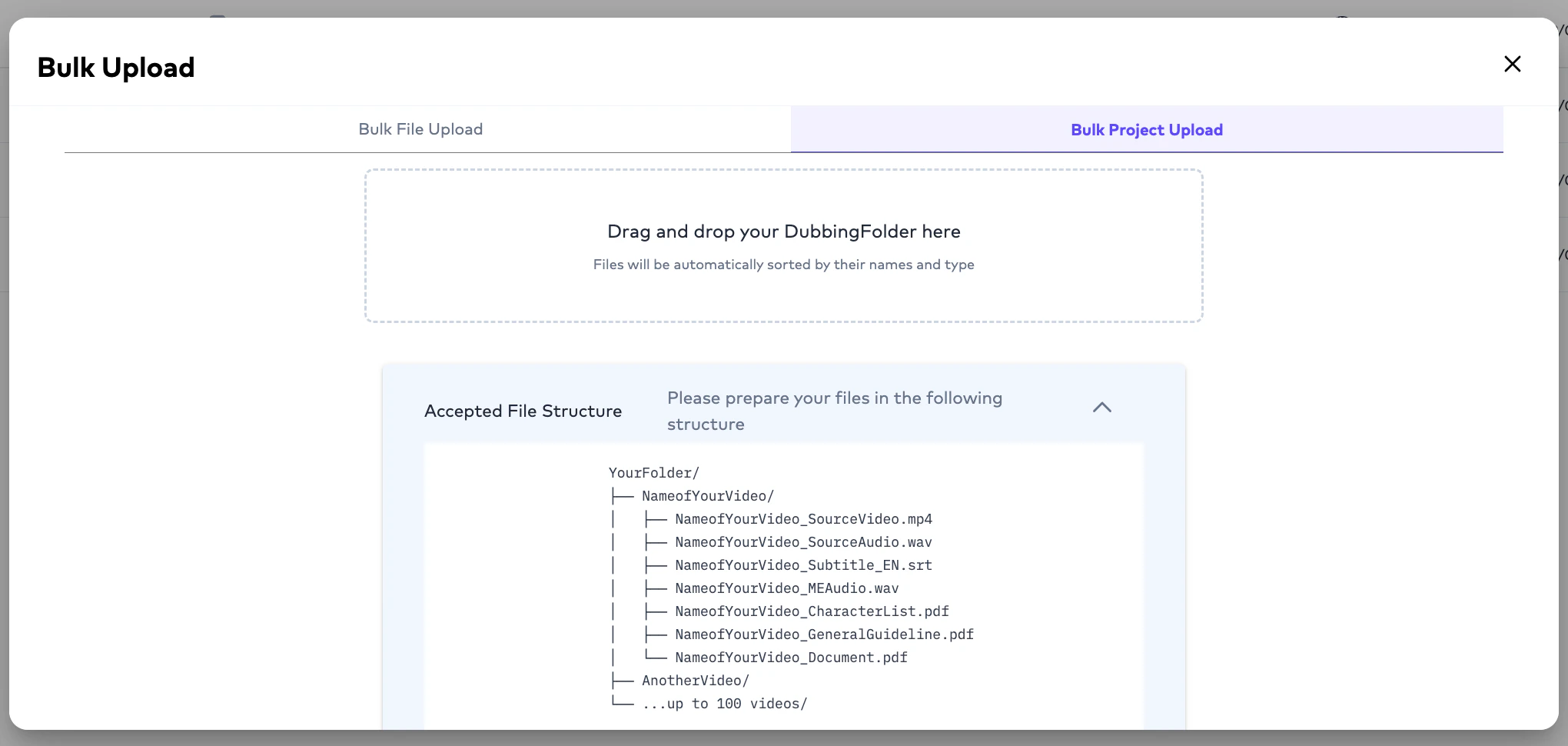
How Bulk Project Upload Works
Each Project should exist inside:- its own dedicated folder.
- files must follow a consistent naming structure.
- each folder becomes a Project,
- and all associated files are automatically linked to that Project.
Example Folder Structure
What Happens During Upload?
When the folder is dragged into Ollang:- source videos are identified,
- subtitle references are linked,
- M&E assets are associated,
- guidelines are attached,
- and supporting files are preserved.
- manual onboarding effort,
- repetitive uploads,
- and project setup time.
Benefits of Bulk Project Upload
Bulk project upload helps organizations:- onboard large media libraries faster,
- reduce manual project creation,
- preserve structured file relationships,
- standardize localization operations,
- and accelerate multilingual order creation.
Bulk Upload workflows are especially recommended for organizations managing high-volume localization pipelines or episodic content libraries.
- source videos
- subtitle files
- M&E files
- documents
- additional reference files
Upload Behavior by Workflow Type
- AI Dubbing
- Subtitle Translation
- Video Captioning
- Document Translation
- Studio Dubbing
AI Dubbing workflows commonly use source video or audio files, subtitle references, M&E files, and voice instructions.
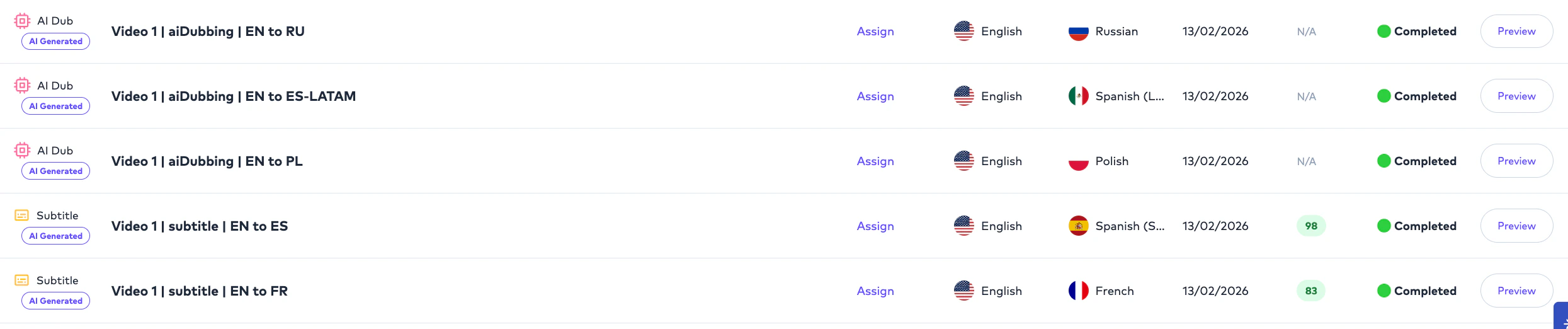
Multi-Workflow Project Example
A single Project can support multiple Orders using the same source and supporting assets.Important Operational Notes
Can a Project contain both video and document assets?
Can a Project contain both video and document assets?
Yes. A Project may contain multiple asset types. The selected Order type determines which asset is used for localization.
Can subtitle files act as source files?
Can subtitle files act as source files?
Yes. Subtitle file such as SRT can be used in subtitle-based localization workflows and can also support video or dubbing workflows.
What is the difference between a primary source asset and a supporting asset?
What is the difference between a primary source asset and a supporting asset?
The primary source asset is the main file being localized. Supporting assets provide additional context, timing, terminology, audio layers, or workflow guidance.
Why are M&E files important for dubbing?
Why are M&E files important for dubbing?
M&E files preserve background music and effects while localized vocals replace the original spoken audio.
Can multiple Orders reuse the same uploaded assets?
Can multiple Orders reuse the same uploaded assets?
Yes. Multiple Orders under the same Project can reuse the same primary source asset and supporting files.